


Sourcing industry and economic data in BMI
16/06/2024

BMI (formerly FitchConnect) users, have you tried out the data export function?
In case you don’t know… in addition to its country and industry reports, BMI includes a huge data bank of macroeconomic and industry data, available for download and manipulation.
Here, to demonstrate how easy it is, we will chart the nominal GDP per capita for the last ten years plus five years of forecasts for the MINT countries: Mexico, Indonesia, Nigeria and Turkiye (Turkey). For comparison purposes we will opt to display the data in US$.
Getting started:
To begin, select the ‘Bulk Data Export’ option from the left hand menu.
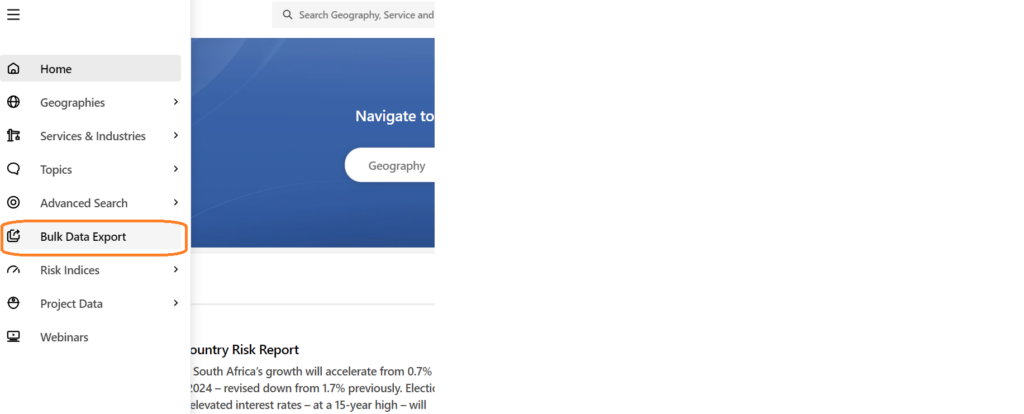
Selecting your data is an easy 4-step process using the options in the left hand panel.
Step 1: Select your Geographies:
Select the country or countries you require from the Geographies options. Within Geographies you can either browse by continent using the > icons or search using the ‘Find a Geography’ box.
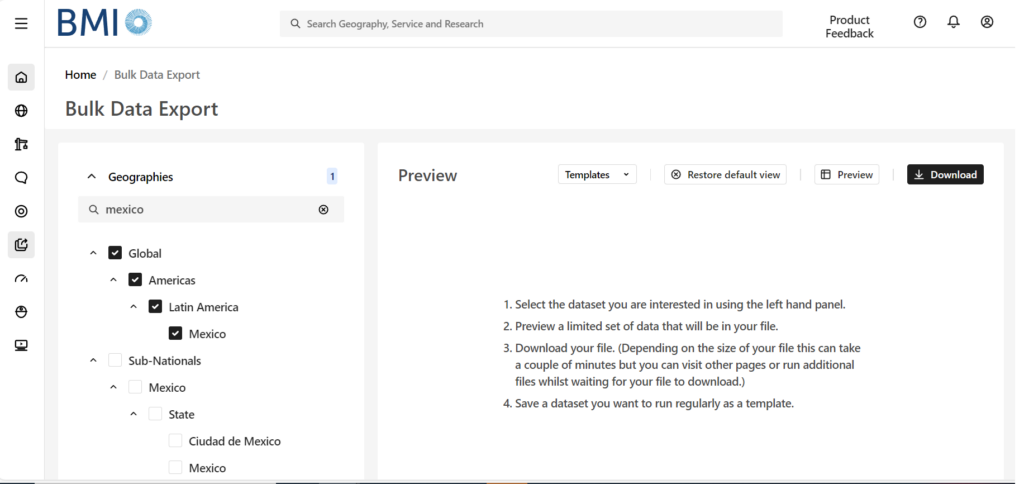
Remember to select each of the countries you require using the check-boxes before you move to the next step. The number of countries selected should be displayed next to the Geographies heading.
Step 2: Select your Data Item(s):
Now click on ‘Data Items’ to select the specific data you want to use. BMI contains a databank of more than 2.7 million lines of data covering both industrial markets and macroeconomic data. For GDP, we will need the ‘Macro Economic’ menu. Open it using the > icon next to the title.
Wherever you see the > icon, you can open further sub-menus to drill further into the data. If you are unsure of where to find the data items you require, search for them using the ‘Find a Data Item’ box.
Hovering over the ‘i’ icon will give you the definition for a dataset.
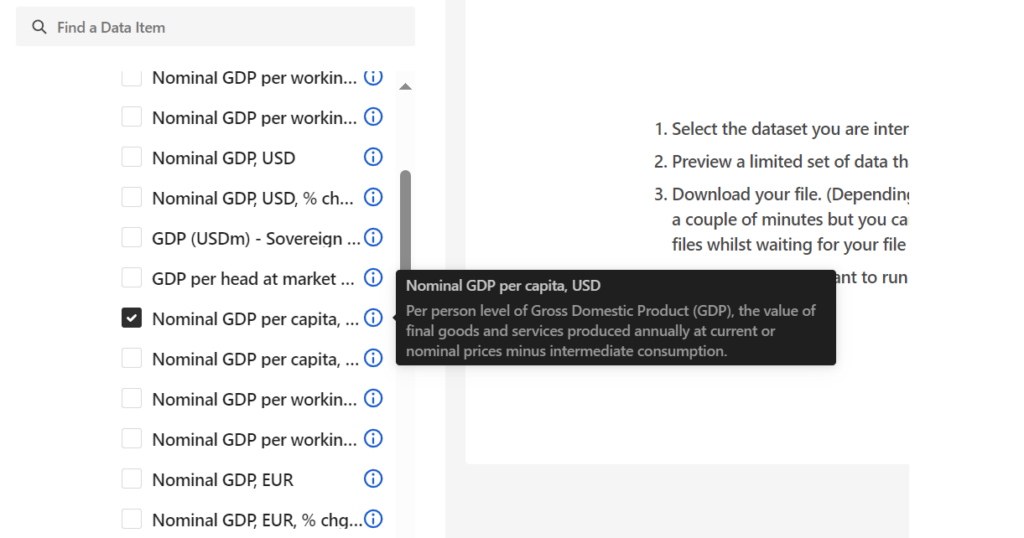
Select your dataset option(s) then scroll down to open the date range menu.
Step 3: Select Date Range:
Select your data range and frequency. Data may be reported monthly, quarterly or annually so you may have to select your preferred option. Be aware that most data is only reported on an annual basis. Depending on the datasets you have selected, your options here may vary. Where forecasts are available, BMI will allow you to select future dates.
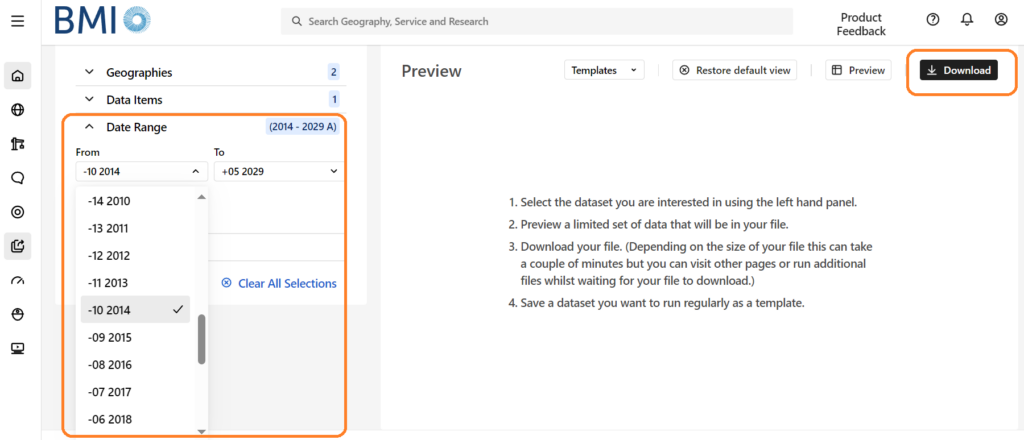
From here, you can preview your dataset or download data directly to Excel via the options at the top right.
If you are interested in downloading and charting data, you may also want to read our post on Finding economic data in Passport.
If you have any questions about downloading data or charting within our resources, feel free to contact the Library

Categories & Tags:
Leave a comment on this post:
You might also like…

When AI gets it wrong, who answers? Bridging the ‘confidence gap’ for tech-enabled transformation
Ask AI why it exists and it will tell you it was developed to enable machines to perform ‘human-like intellectual tasks’ including reasoning, learning and problem-solving. We seek out AI to help find answers: ...

Reducing your costs as an international student (without missing out)
Moving to another country to study is exciting, and it's also a big financial step. The good news is that budgeting doesn't have to mean missing out. We asked Dr Lakshmy Subramanian, Course Director ...

Need some help settling in? Wobble Week 2026
Whether you’re finding it hard to settle into your course or accommodation, you arrived late and are struggling to catch up, you feel overwhelmed or you can’t remember everything you’ve already been told, we can ...
Moving to the UK to study? How to plan for banking, exchange rates and transfers
Currency and banking are two of the most practical parts of financial planning for international students. They are also often the most overlooked. We asked Dr Lakshmy Subramanian, Course Director for Cranfield University's Banking, ...

Cranfield: an environment where innovation thrives
The latest Knowledge Exchange Framework rankings from UK Research and Innovation (UKRI) gives an insight into the real and meaningful impact that UK universities have. The seven categories that make up KEF6 cover everything ...

How Cranfield accelerated my career in Logistics and Supply Chain Management
After graduating from the MSc in Logistics and Supply Chain Management at Cranfield University, I've been reflecting on the experiences that made my journey so valuable and the impact it has had on my ...