


Using the Bloomberg Excel Add-in
12/11/2018

In an earlier post we explained how to install the Bloomberg Office add-in which allows data to be exported from the Bloomberg terminal to Excel.

Within Excel, the Bloomberg add-in toolbar has various tools you can use to draw data from the Bloomberg terminal directly into Excel.
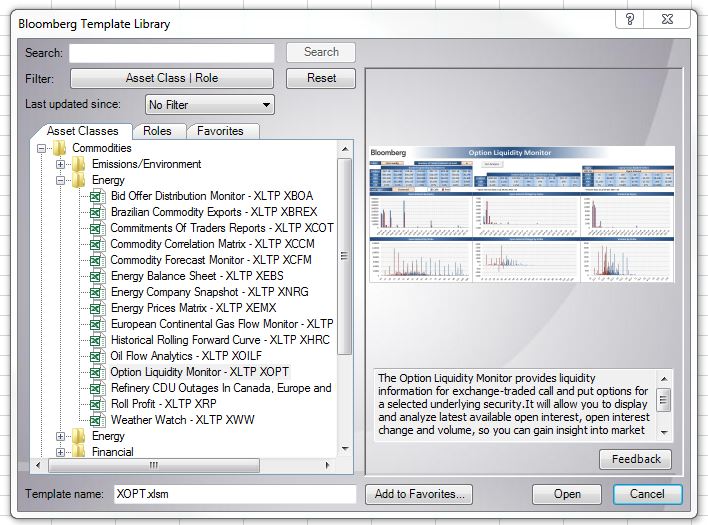
One of the tools, the Template library, provides predefined templates covering different financial areas to allow you to pull relevant data from Bloomberg. Highlight any template name to get a description of what it covers.
Another useful tool is the Import Data option. This uses a Bloomberg Data Wizard to guide you through several steps where you specify the security, the data you need and the dates you need it for. This is the easiest way to extract data from Bloomberg as it writes the Bloomberg API formulas for you.
However if you need more flexibility than the wizards allow, you can write your own formulas.
The detailed help function <HELP DAPI> guides you through this:

When creating a formula, you need to specify the security (ticker, market sector), e.g. IBM US Equity; and the field (datatype), e.g. PX_LAST and a field. You can use the Field search tool (<FLDS>) on the Bloomberg tab to find the field mnemonic by category or keyword.
Depending on the type of data you want to download, you can use one of the following:
BDP (Bloomberg Data Point) – This returns data to a single cell. It contains only one ticker and one field.
= BDP (Security, Field) e.g. =BDP(“IBM US Equity”, “Px_Last”) retrieves the price of the last trade on IBM stock.
BDH (Bloomberg Data History) – This formula returns the historical data for a selected security.
=BDH (Security, Field, Start Date, End Date) e.g. =BDH (“IBM US Equity”, “Px_Last”,”01/01/01″, “12/31/01”) retrieves the closing prices for IBM from the first to the last day of 2001.
BDS (Bloomberg Data Set) – This formula returns multi-cell descriptive data.
=BDS(Security, Field) e.g. =BDS (“IBM US Equity”, “CIE_DES_BULK”) retrieves IBM’s company business description.
As always, if you need any assistance with Bloomberg, please contact the Library.

Categories & Tags:
Leave a comment on this post:
You might also like…

Moving to the UK to study? How to plan for banking, exchange rates and transfers
Currency and banking are two of the most practical parts of financial planning for international students. They are also often the most overlooked. We asked Dr Lakshmy Subramanian, Course Director for Cranfield University's Banking, ...

Cranfield: an environment where innovation thrives
The latest Knowledge Exchange Framework rankings from UK Research and Innovation (UKRI) gives an insight into the real and meaningful impact that UK universities have. The seven categories that make up KEF6 cover everything ...

How Cranfield accelerated my career in Logistics and Supply Chain Management
After graduating from the MSc in Logistics and Supply Chain Management at Cranfield University, I've been reflecting on the experiences that made my journey so valuable and the impact it has had on my ...

Mendeley: a powerful tool to organise and manage your references
Are you looking for a way to manage your references, create in-text citations and reference lists for your assignments or thesis? If so, you may wish to consider using Mendeley. What is it? Mendeley is ...

Keen to develop your study skills?
Alongside the technical skills and academic knowledge that you will gain on your course, as a Cranfield student you have the opportunity to develop a range of other skills that can enhance your learning experience. ...

The V-conomy: powering the sixth wave of global economic growth
The world could be on the verge of a major surge in economic growth and development, driven by the convergence of AI and clean energy technology. Waiting to ride the K-wave The Russian ...
Comments are closed.