


Introducing… Scopus
16/04/2026

Scopus is one of the largest and most trusted academic databases, indexing millions of peer‑reviewed articles, conference papers, books, and preprints across every major discipline.
Scopus contains more than 100 million records and over 30,000 active serial titles, which gives you a broad overview of global research activity. It includes material from more than 7,000 publishers and covers over 330 subject areas.
To successfully search the literature, you need to understand the language and terminologies used by the scholars in your research field. This will enable you to identify the keywords you need to use to find relevant documents. You will have already identified themes/concepts to your research and some relevant keywords through preliminary searches and reading. You can find information about selecting keywords and building your search string on the library website here, and our blog post on Search tips for using our online resources effectively.
Getting started:
- Go to the library homepage at https://library.cranfield.ac.uk/home
- Click on Databases (just below Library Search)
- Find Scopus in the featured Databases highlight (or click S and find Scopus in results list)
- Click on Scopus. (If not signed in, click on sign in, then select ‘Access through your organization’ and follow the steps)
Signing in
Click Sign in in the top right corner of the screen and select A’ccess through your organization’. You may be prompted to enter your Cranfield email address and password and/or use the authenticator app. Once you are signed in, your initials will appear in the top right corner of the screen. You can then begin your search.
Searching Scopus
Document search includes journal articles, book chapters, conference proceedings, articles in press, and data papers
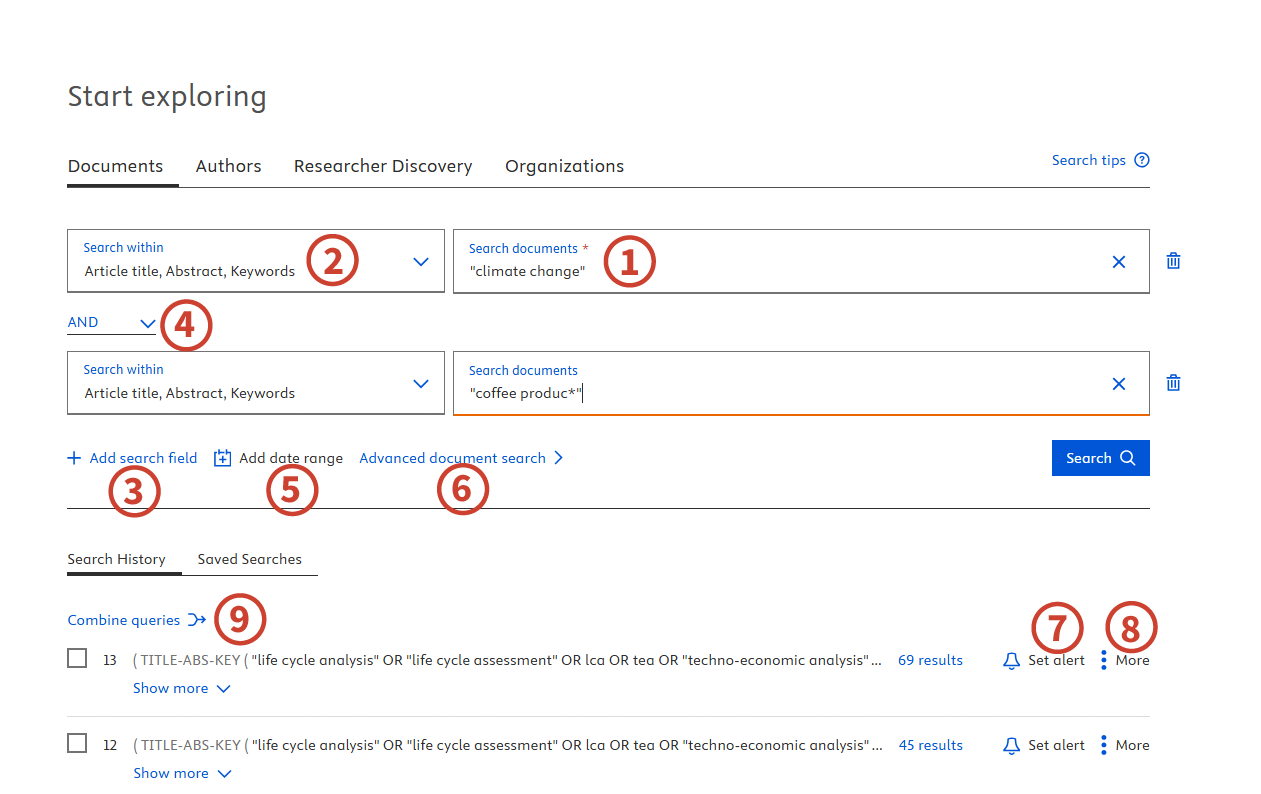
- Get started by entering your keywords in the Search documents box [1]
- By default, Scopus searches in the Article title, Abstract and Keywords of a document record. You can specify in which fields to search using the drop-down menu [2]
- Use the +Add search field [3] option to add additional fields, for example if you wish to add another concept to your search
- Each new search field is combined using the Boolean operators AND, OR, and NOT [4]. Each new search field is by default combined using the Boolean operator AND, but there are also options for OR, and NOT
- Select Add date range [5] to either select a publication date range or to specify an ‘added to Scopus’ date range
- To see a complete list of advanced field codes, select Advanced document search [6]
- Your Search History is displayed with the option to Set Alert [7] to notify you by email of new search results in Scopus that match that search
- Select More [8] to save an important query or to delete a query
- To combine queries from your history, choose two or more searches and select Combine queries [9].
From the results page, you can analyse your search, edit your search, save your search and set alerts.
- Saving your search and setting up alerts [1]
- Quickly review or edit your search from the top of the page [2]
- By default, the search results are sorted by date. Use the ‘Sort by’ drop-down menu to sort in a different order (by relevance for example) [3]
- Refine your results [4] From the left-hand menu, you can:
- Search within your results
- Use filters to limit to or exclude results from your search, including
- Author name
- Year
- Subject area
- Document type
- Source title
- Keyword
- Country/Territory
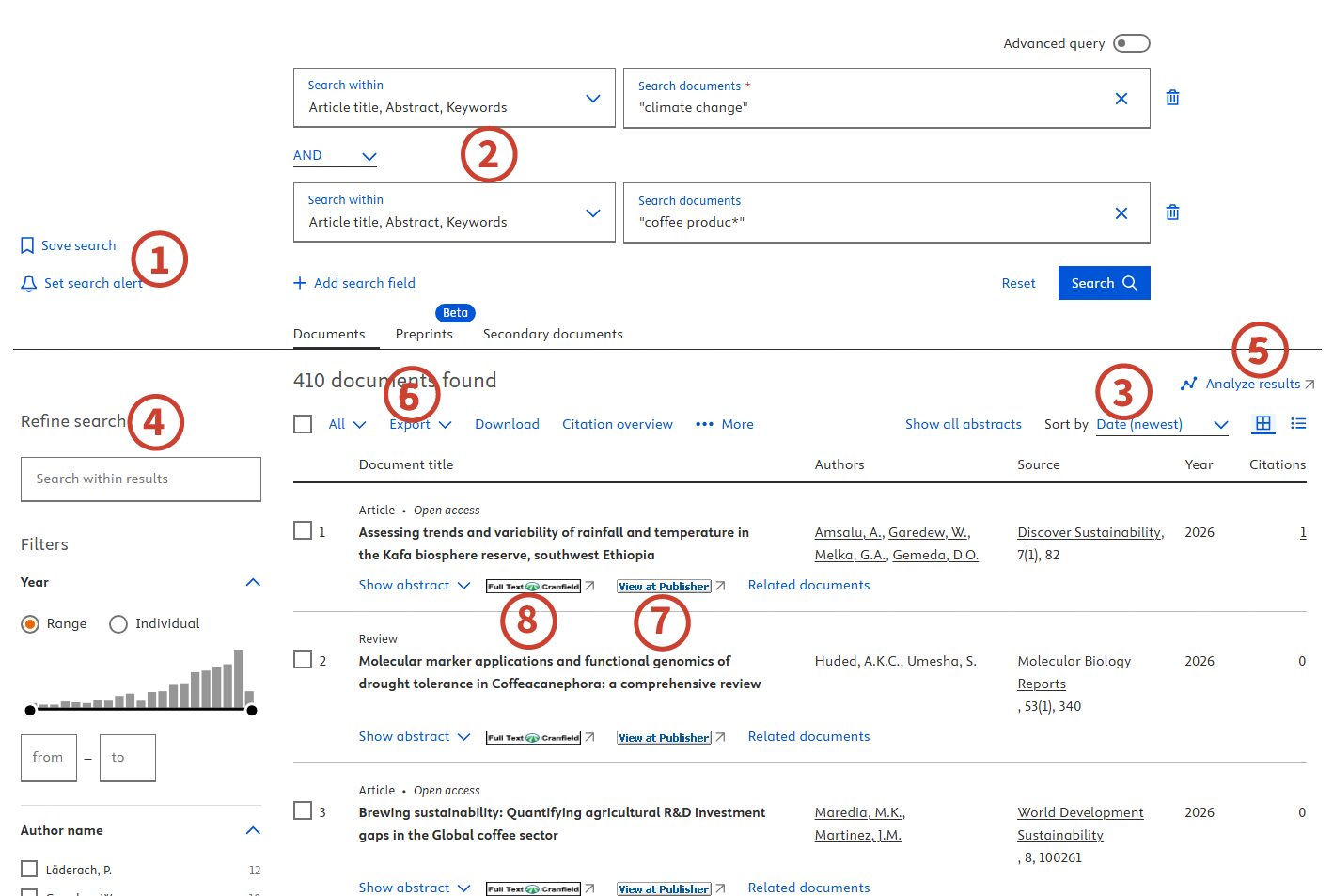
The Analyze results button lets you explore your search results visually [5], with interactive charts. This could help you find answers to questions such as:
- How much has been published on this topic in recent years?
- In what years were the greatest number of items published on this topic?
- Which journals are publishing the most on this topic?
- Who are the leading researchers and scholars writing about this topic?
- Which institutions are publishing the most on this topic?
You can export your search results [6] to a variety of different file types.
Getting full text:
If a ‘View at publisher’ button is displayed [7], click on it to view the full article. Where there is no full text link, clicking the Fulltext@Cranfield button [8] to check if you can access this article form any other Library subscriptions.
Search tips
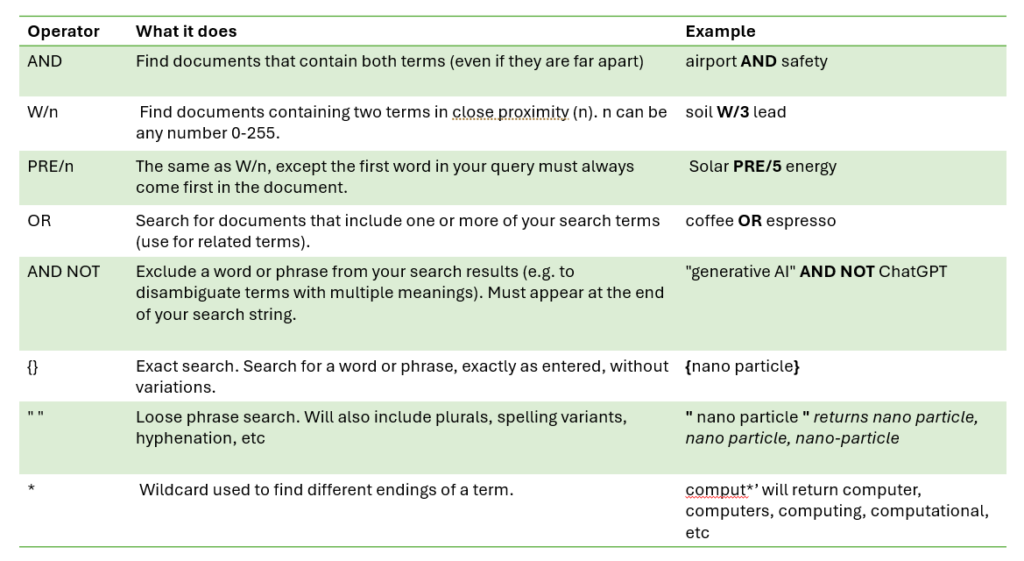
Search operators can help you fine-tune your search to find the most relevant results.
Getting help
Click on the Help option in the top right-hand corner of the Scopus search screen, or check the LibGuide from Elsevier here: https://elsevier.libguides.com/Scopus/home
There is further guidance on searching the literature on our Library website. If you have any questions or would like guidance on effective searching, please contact the Library.
Feature image from Pixabay. Available at: https://pixabay.com/photos/woman-laptop-desk-workspace-1851464/

Categories & Tags:
Leave a comment on this post:
You might also like…

Keen to develop your study skills?
Alongside the technical skills and academic knowledge that you will gain on your course, as a Cranfield student you have the opportunity to develop a range of other skills that can enhance your learning experience. ...

The V-conomy: powering the sixth wave of global economic growth
The world could be on the verge of a major surge in economic growth and development, driven by the convergence of AI and clean energy technology. Waiting to ride the K-wave The Russian ...

Need help using the Python programming language?
We know some of our students are currently trying to learn Python, so we wanted to make you aware of some great LinkedIn Learning videos that can help. But don't you have to pay for ...

What does it really take to become a Chevening Scholar?
Say “Turkmenistan” to most people and you’ll get a blank look. That was true when I left Ashgabat for the UK to study an MSc in Logistics and Supply Chain Management at Cranfield University ...

Get a head start on referencing and plagiarism
We offer a module on Referencing And Avoiding Plagiarism which you can find on your Canvas dashboard. It explains the role and importance of citing references and how to incorporate the work of other authors ...

How Cranfield shaped my journey as an Aerospace Engineer
If I'm being specific about the moment it clicked, it was reading a paper called "On the Role and Challenges of Computational Fluid Dynamics (CFD) in the Aerospace Industry" by two Boeing engineers, P. ...