


Exploring supply chain data on Bloomberg and Workspace
02/10/2025

Have you ever wondered where to start researching a company’s customer and supplier relationships? Well, wonder no longer.
Bloomberg
In Bloomberg there is a whole section devoted to supply chain data. If you’re new to Bloomberg, we would advise booking some introductory training with a librarian – or at least reading our post on Bloomberg basics before you set up your account.
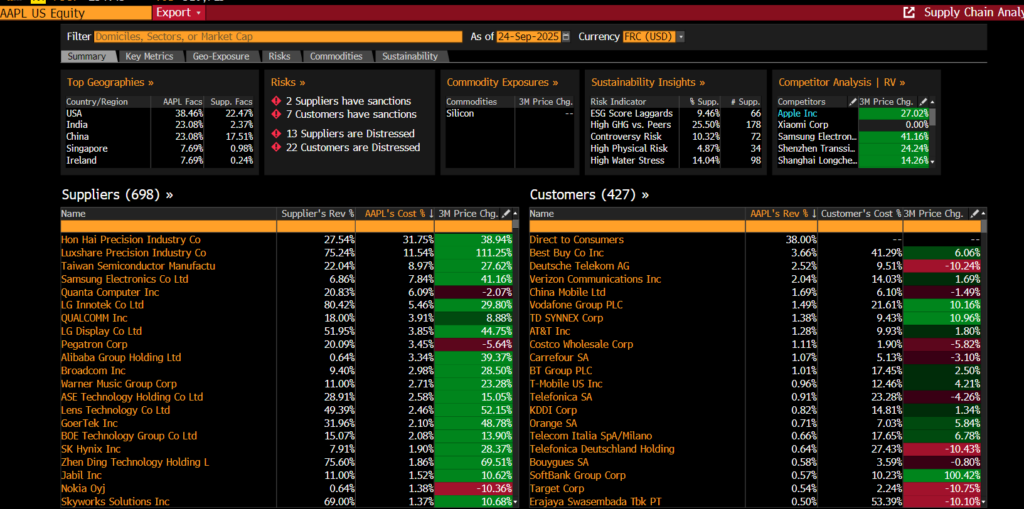
To access supply chain data, use Bloomberg’s Supply Chain Analysis (SPLC) function, <SPLC>. Either type the code into any company screen and click on <GO> or, more experienced Bloomberg users can combine this into a search, e.g. <SPLC AAPL US> <GO> to get the supply chain analysis for Apple, Inc.
The SPLC function aims to provide a “comprehensive supply chain breakdown for a selected company”. Users can analyse revenue exposure for the central company, its suppliers, and its customers, as well as track the company’s geographic, commodity, sustainability, and risk exposures. It focuses on “actual business relationships” and helps to show the money flows between companies.
The SPLC Summary screen displays a company’s suppliers and customers along with the amount of business they represent:
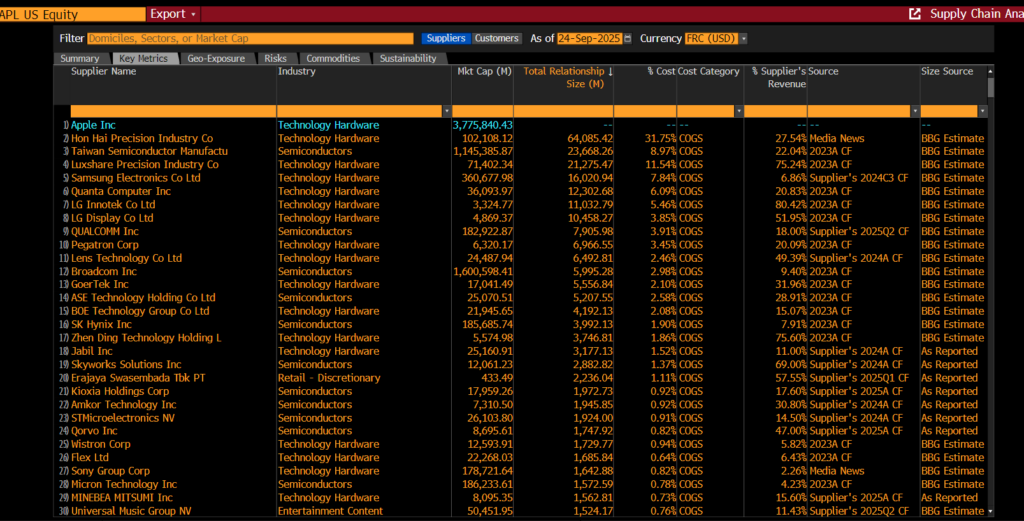
The ‘Key Metrics’ tab provides a sortable and filterable table of supplier or customer data so you can dig into relationship details:
To break down the company’s exposures by different criteria, select a tab:
- Summary: See all suppliers or customers along with the amount of business they represent.
- Key Metrics: Review all suppliers or customers in a filterable table view.
- Geo-Exposure: Break down companies by the geographic location of their domicile or factories.
- Risks: Gauge risks to supply chain or revenue by understanding default risk, consensus growth expectations, and sanctions exposure for key counterparties.
- Commodities: Assess publicly disclosed exposures to key materials
- Sustainability: Review related companies’ sustainability insights
Workspace
Workspace also provides supply chain data for companies via its Value Chain app. It aims to show the relationships a company has with its suppliers and customers.
If you have never used Workspace before, you can register for an account using these instructions, then we recommend that you read our post on Getting started with Workspace for a quick introduction. If you already have a Workspace account you can access it online here.
To access the Value Chain for a company, open any company overview, for example Meta Platforms Inc. (Facebook). Go to the ‘Peers & Valuations’ tab and select ‘Value Chains’ (or simply type VChain in the search box at the top left hand corner of the screen).
Several types of Views are available – including grid / industry breakdown /geographic breakdown. Choose the one that meets your needs.
In the following grid view for Meta, the suppliers and customers are shown with information on where they are based, what type of company they are and a confidence score (“Ranging from 0 to 100%, this score indicates how confident we are that the supplier-customer relationship is valid.”). Revenue and implied rating is also available.
Data values can also be exported to Excel for further analysis.
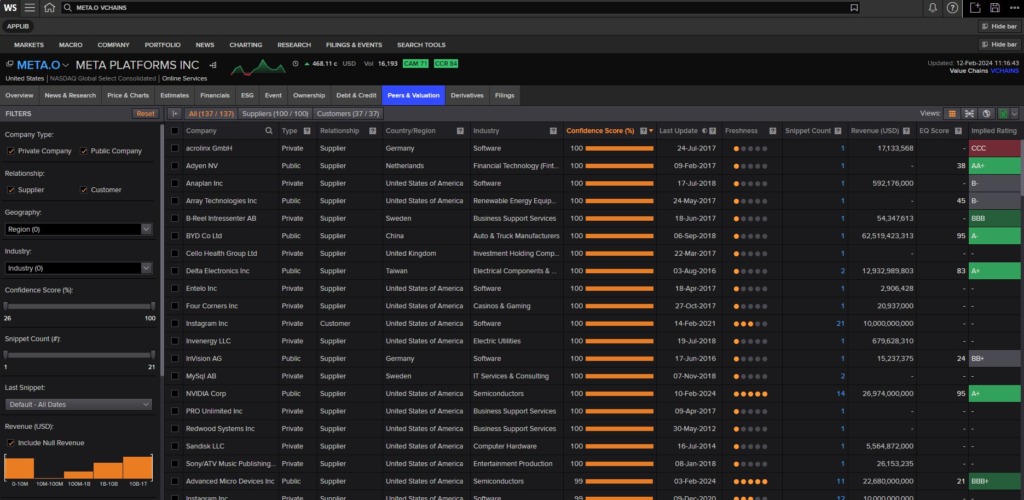
Workspace (2024) Meta Platforms (Facebook) Inc Value Chain grid
Click on the Industry Breakdown icon in ‘Views’ at the top right of the screen (hover over an icon to identify it). This shows the suppliers and customers by broad industry areas. Clicking on the individual industry name will display individual company names.
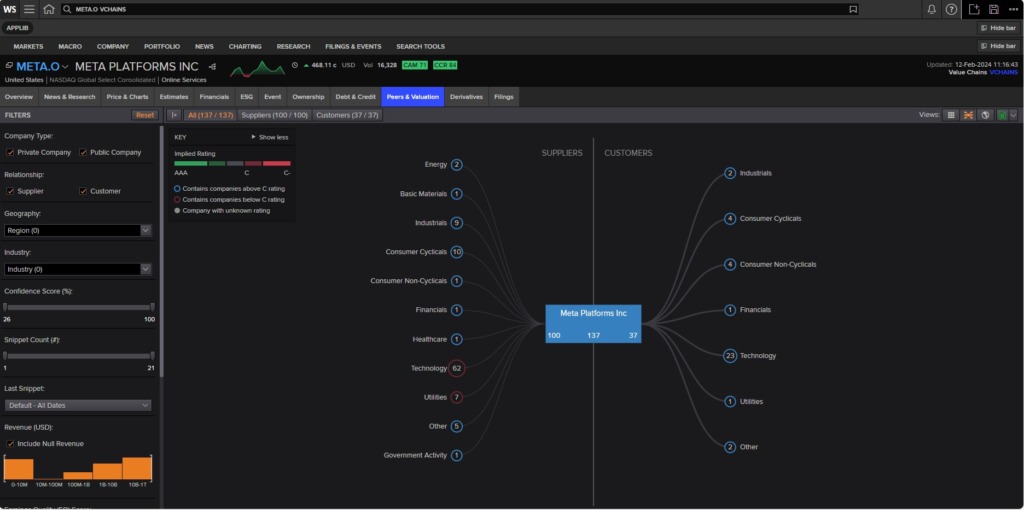
Workspace (2024) Meta Value Chain Industry view
Want to find out more about these resources? Please contact the Library.
Feature image from Pixabay. Available at: https://cdn.pixabay.com/photo/2016/11/27/21/42/stock-1863880_960_720.jpg

Categories & Tags:
Leave a comment on this post:
You might also like…

Keen to develop your study skills?
Alongside the technical skills and academic knowledge that you will gain on your course, as a Cranfield student you have the opportunity to develop a range of other skills that can enhance your learning experience. ...

The V-conomy: powering the sixth wave of global economic growth
The world could be on the verge of a major surge in economic growth and development, driven by the convergence of AI and clean energy technology. Waiting to ride the K-wave The Russian ...

Need help using the Python programming language?
We know some of our students are currently trying to learn Python, so we wanted to make you aware of some great LinkedIn Learning videos that can help. But don't you have to pay for ...

What does it really take to become a Chevening Scholar?
Say “Turkmenistan” to most people and you’ll get a blank look. That was true when I left Ashgabat for the UK to study an MSc in Logistics and Supply Chain Management at Cranfield University ...

Get a head start on referencing and plagiarism
We offer a module on Referencing And Avoiding Plagiarism which you can find on your Canvas dashboard. It explains the role and importance of citing references and how to incorporate the work of other authors ...

How Cranfield shaped my journey as an Aerospace Engineer
If I'm being specific about the moment it clicked, it was reading a paper called "On the Role and Challenges of Computational Fluid Dynamics (CFD) in the Aerospace Industry" by two Boeing engineers, P. ...
Comments are closed.