


Preparing your work for Turnitin submission
18/12/2025

Before submitting your work into Turnitin for similarity checking, if you have used referencing software then you may need to take some important steps first.
Mendeley and Zotero integrate with MS Word by embedding field codes behind your citations and references. These field codes connect your Word document to the reference management software, ensuring citations and reference lists display correctly. However, field codes also increase the file size of the Word document and may cause issues when checking your work in Turnitin.
There are two important steps that you should take before submitting work to Turnitin to avoid your document getting corrupted.
Step One
Save your original document with the field codes intact in a safe location such as your Cranfield University OneDrive. Then create a second copy for Turnitin submission. The original version can be retrieved if you need to make further edits, or if the second copy becomes corrupted.
Step Two
Remove the field codes from the second copy. This action is permanent and should only be done once you have finished editing. Removing codes will break the link between your Word document and the reference management software, leaving the document as plain text. After this, the software will no longer automatically update your reference list.
To remove Mendeley field codes from a Word document:
- Select all the text (Ctrl+A or Cmd+A) from your document
- Right click and select ‘Remove content control’
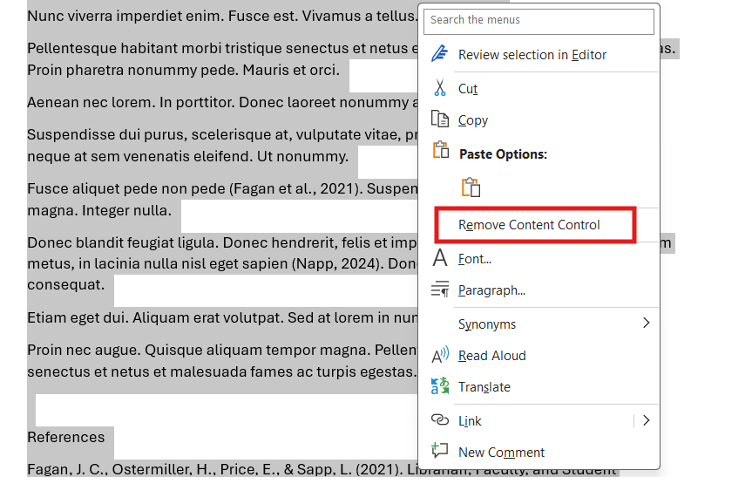
Removing Mendeley field codes from your text
To remove Zotero field codes from a Word document:
- Under the Zotero tab in Word, click ‘Unlink citations’
- Confirm the action by clicking OK on the warning pop-up.
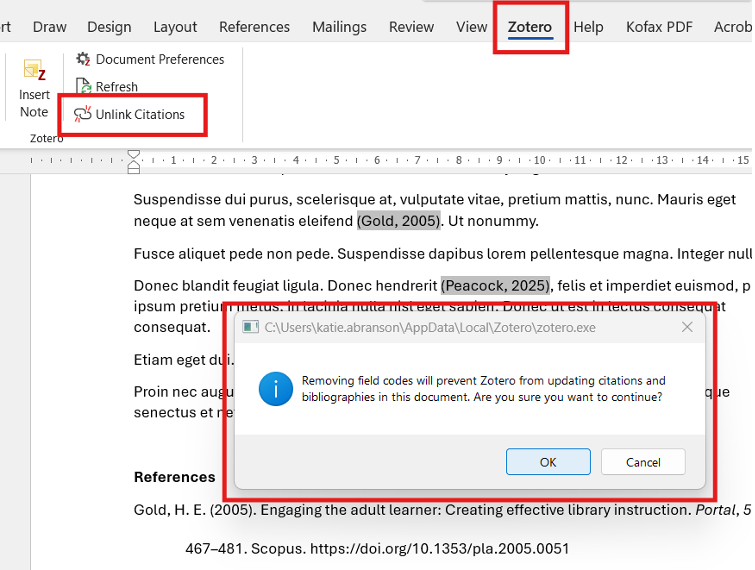
Removing Zotero field codes from your text
All the text in your document will now be converted to plain text, unlinked from the reference manager, and ready for uploading into Turnitin.
These steps are also important when preparing a document for publication, as many journal publishers require field codes to be removed before submission.
If you have any questions about reference management software such as Mendeley and Zotero, please contact the Library. For Turnitin questions, please speak to your SAS Lead in the first instance.
Feature image from Pixabay. Available at https://cdn.pixabay.com/photo/2016/06/01/06/26/open-book-1428428_960_720.jpg

Categories & Tags:
Leave a comment on this post:
You might also like…

Reducing your costs as an international student (without missing out)
Moving to another country to study is exciting, and it's also a big financial step. The good news is that budgeting doesn't have to mean missing out. We asked Dr Lakshmy Subramanian, Course Director ...

Need some help settling in? Wobble Week 2026
Whether you’re finding it hard to settle into your course or accommodation, you arrived late and are struggling to catch up, you feel overwhelmed or you can’t remember everything you’ve already been told, we can ...
Moving to the UK to study? How to plan for banking, exchange rates and transfers
Currency and banking are two of the most practical parts of financial planning for international students. They are also often the most overlooked. We asked Dr Lakshmy Subramanian, Course Director for Cranfield University's Banking, ...

Cranfield: an environment where innovation thrives
The latest Knowledge Exchange Framework rankings from UK Research and Innovation (UKRI) gives an insight into the real and meaningful impact that UK universities have. The seven categories that make up KEF6 cover everything ...

How Cranfield accelerated my career in Logistics and Supply Chain Management
After graduating from the MSc in Logistics and Supply Chain Management at Cranfield University, I've been reflecting on the experiences that made my journey so valuable and the impact it has had on my ...

Mendeley: a powerful tool to organise and manage your references
Are you looking for a way to manage your references, create in-text citations and reference lists for your assignments or thesis? If so, you may wish to consider using Mendeley. What is it? Mendeley is ...
Comments are closed.