

Click on the CrossMark logo for peace of mind!
07/12/2015

Think how embarrassed you would feel if you cited a paper that had been retracted! A retraction means that the publisher has withdrawn the paper.
I helped a student recently who had found an article he wanted to cite in his work. It wasn’t until we viewed the publisher’s version of the PDF that we saw a ‘retracted’ watermark. It had been retracted because large parts of it had been found to be plagiarised from another journal article. We had been checking the publisher’s version for something else so it was pure luck that we spotted it. This experience brought home to me how hard it can be to find information about retractions and updates to scholarly publications.
The CrossMark scheme from CrossRef is designed to make finding the current status of an article easy. Increasing numbers of publishers are including a CrossMark logo on the PDF or web version of an article (or indeed a book, conference paper or any other scholarly publication). If the logo is present and you are online, click on it each time you open the document, even if you’ve saved it locally. It’s a live link that will give you up to date information about the status of the article. If it has been corrected, retracted or updated you will be able to find out and take appropriate action.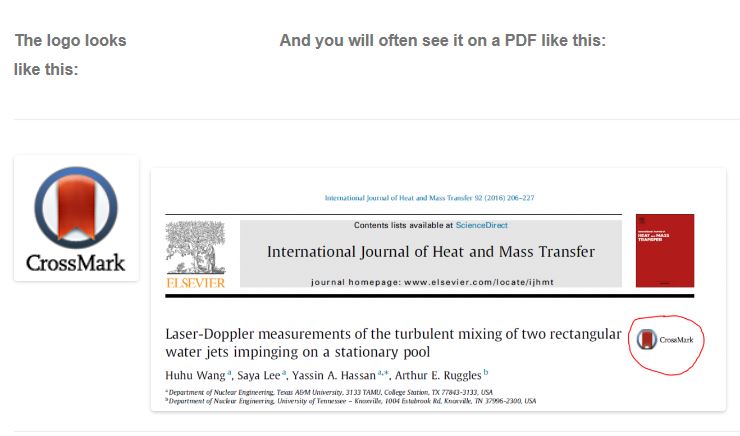
|
|
Click on the logo and you will see one of two things:

The green tick is good news! It confirms that the version you are looking at is current and a DOI link to the publisher’s version is given.

The blue exclamation mark means that a correction has been made to the paper.
A click on the DOI of this one shows that the spelling of an author name has been corrected – in this case nothing that would prevent you citing the paper.
For further information and a very helpful video visit http://www.crossref.org/crossmark/.
You may also find Retractionwatch.com interesting. This is a blog that tracks retractions from the scholarly literature and provides a commentary for each.

Categories & Tags:
Leave a comment on this post:
You might also like…
Library services over Easter, 3-6 April
Kings Norton Library will remain open for study 24/7. You will need your University ID card to enter the building and can use the self-service machines to borrow and return items as usual. Barrington Library ...

How do I access the full-text of Harvard Business Review (HBR)?
This is a frequently asked question, and it's worth knowing how to access this key management journal. So, how do you access HBR in full-text? The short answer is via our eJournals finder. You can find ...
Engineering problem to solve? Let Knovel help you find a solution
Did you know that Knovel provides you with more than just eBooks? Knovel is a key database for many engineering, mechanical and materials courses here at Cranfield University, and contains content from an extensive range ...

What happens when female scholars meet influential leaders?
On the 5 March 2026, our British Council Women in STEM Scholars had the privilege of sitting down with two excellent role models of industry and academia: Professor Dame Karen Holford, ...

From MSc to CEO: Igniting a research revolution
For many, a master’s degree is achieving a big milestone. Kilyan Ocampo, Computational Fluid Dynamics alumni shares how studying at Cranfield helped launch his career in the energy sector. Today, Kilyan ...


Commuting, collaborating and growing: My first term experience at Cranfield
My first term at Cranfield University has been an extremely positive and rewarding experience. While the course has been intense at times, it has pushed me in the best possible way and allowed me ...