

Click on the CrossMark logo for peace of mind!
07/12/2015

Think how embarrassed you would feel if you cited a paper that had been retracted! A retraction means that the publisher has withdrawn the paper.
I helped a student recently who had found an article he wanted to cite in his work. It wasn’t until we viewed the publisher’s version of the PDF that we saw a ‘retracted’ watermark. It had been retracted because large parts of it had been found to be plagiarised from another journal article. We had been checking the publisher’s version for something else so it was pure luck that we spotted it. This experience brought home to me how hard it can be to find information about retractions and updates to scholarly publications.
The CrossMark scheme from CrossRef is designed to make finding the current status of an article easy. Increasing numbers of publishers are including a CrossMark logo on the PDF or web version of an article (or indeed a book, conference paper or any other scholarly publication). If the logo is present and you are online, click on it each time you open the document, even if you’ve saved it locally. It’s a live link that will give you up to date information about the status of the article. If it has been corrected, retracted or updated you will be able to find out and take appropriate action.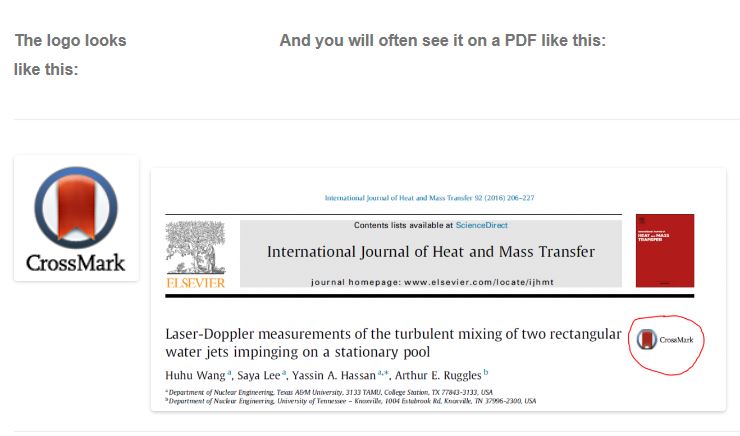
|
|
Click on the logo and you will see one of two things:

The green tick is good news! It confirms that the version you are looking at is current and a DOI link to the publisher’s version is given.

The blue exclamation mark means that a correction has been made to the paper.
A click on the DOI of this one shows that the spelling of an author name has been corrected – in this case nothing that would prevent you citing the paper.
For further information and a very helpful video visit http://www.crossref.org/crossmark/.
You may also find Retractionwatch.com interesting. This is a blog that tracks retractions from the scholarly literature and provides a commentary for each.

Categories & Tags:
Leave a comment on this post:
You might also like…

Keen to develop your study skills?
Alongside the technical skills and academic knowledge that you will gain on your course, as a Cranfield student you have the opportunity to develop a range of other skills that can enhance your learning experience. ...

The V-conomy: powering the sixth wave of global economic growth
The world could be on the verge of a major surge in economic growth and development, driven by the convergence of AI and clean energy technology. Waiting to ride the K-wave The Russian ...

Need help using the Python programming language?
We know some of our students are currently trying to learn Python, so we wanted to make you aware of some great LinkedIn Learning videos that can help. But don't you have to pay for ...

What does it really take to become a Chevening Scholar?
Say “Turkmenistan” to most people and you’ll get a blank look. That was true when I left Ashgabat for the UK to study an MSc in Logistics and Supply Chain Management at Cranfield University ...

Get a head start on referencing and plagiarism
We offer a module on Referencing And Avoiding Plagiarism which you can find on your Canvas dashboard. It explains the role and importance of citing references and how to incorporate the work of other authors ...


How Cranfield shaped my journey as an Aerospace Engineer
If I'm being specific about the moment it clicked, it was reading a paper called "On the Role and Challenges of Computational Fluid Dynamics (CFD) in the Aerospace Industry" by two Boeing engineers, P. ...
Comments are closed.