


Introducing… Boardex for research on company boards and directors
22/09/2022

Recently there have been some changes to the BoardEx service so here is a short reminder of what kinds of information the service holds.
What is BoardEx?
BoardEx provides global board and senior management information for 2.1 million private and public companies and 1.6 million individuals who are board directors and senior managers. Full board details are available for over 41,200 companies – 2,100 UK, 8,800 US company boards and a further 30,300 companies, split between Continental Europe, Australia, Asia pacific and the rest of the world.
Information available includes:
- Director profiles
- Director network
- Company network
- Compensation
- Committee detail
- Board summary
- Organisation analysis
BoardEx Online Access
Enables you to:
- Download director profiles and company board and senior leadership team summaries.
- Track announcements for specific directors and companies – you can sign up to receive e-mail alerts when changes occur.
- Analyse the characteristics of companies’ boards and directors, e.g. age, gender, education.
- Pinpoint the overlaps between directors and your network of contacts to map out potential relationships and assess your ‘relationship capital’.
- Visualize all Board to Board connections at a company level.
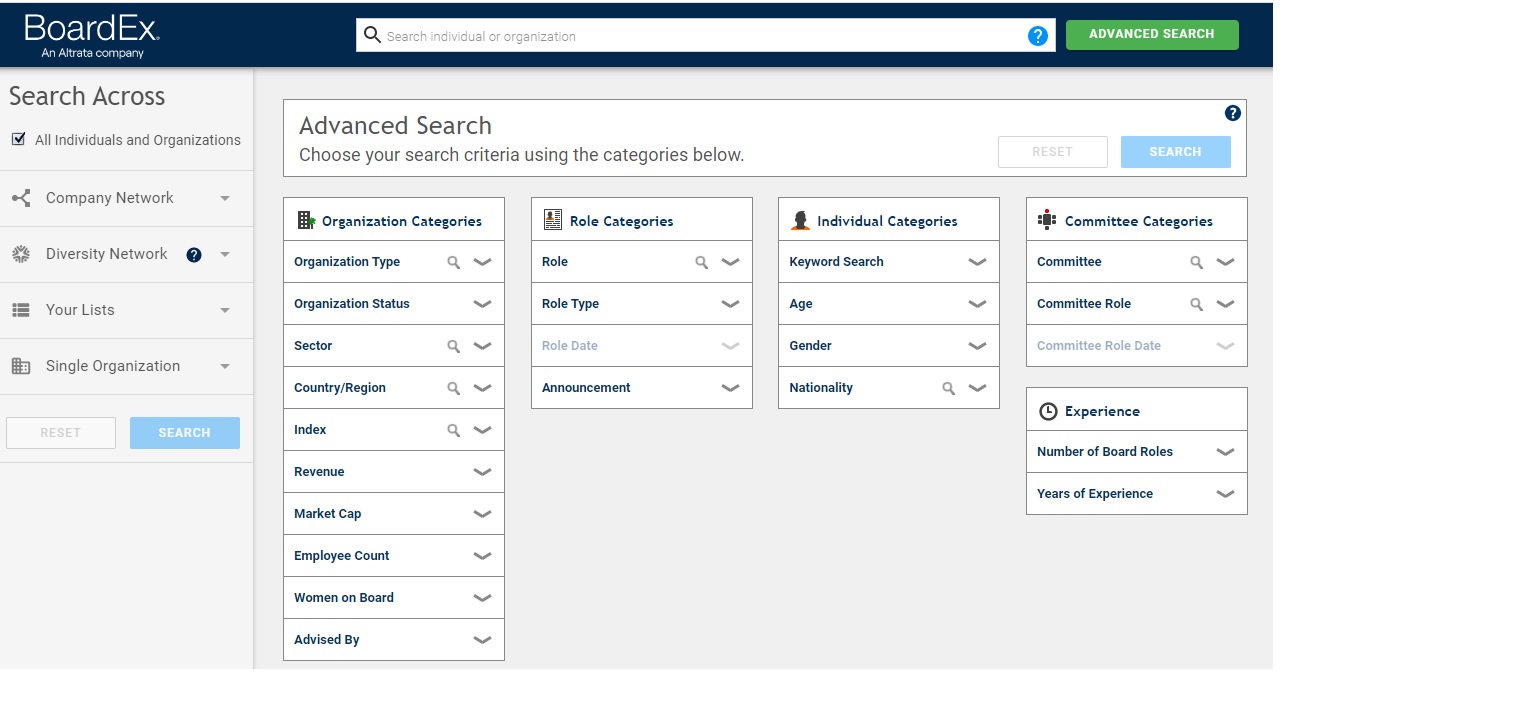
You can use the Simple Search to search across BoardEx for an individual or organisation. Simply enter the name of the company or individual you wish to find and select from the drop down list which appears.

The Advanced Search allows you to find companies and individuals which match your specific criteria, e.g. companies in the UK, in the FTSE 100, or in a specific sector or within a specific turnover range. In terms of board characteristics, criteria include: role, nationality, gender, number of boards sat on.
BoardEx Bulk Download Files
In addition to the on-line service, the University has access to UK, Europe and North-American files of director and board data going back to 1999. Using these it is possible to download information for a number of companies for a period of time.
How do I access BoardEx?
- BoardEx online access is only available via an individual username and password.
- BoardEx Bulk Historical Download Files are held in a protected area of the SoM Group drives and need a password to access them.
- If you would like to know more, or to discuss setting up a BoardEx account then please contact the Library.
Feature image from Pixabay. Available at: https://pixabay.com/photos/skyline-skyscraper-skyscrapers-1925943/

Categories & Tags:
Leave a comment on this post:
You might also like…

How do I access the full-text of Harvard Business Review (HBR)?
This is a frequently asked question, and it's worth knowing how to access this key management journal. So, how do you access HBR in full-text? The short answer is via our eJournals finder. You can find ...

Engineering problem to solve? Let Knovel help you find a solution
Did you know that Knovel provides you with more than just eBooks? Knovel is a key database for many engineering, mechanical and materials courses here at Cranfield University, and contains content from an extensive range ...

What happens when female scholars meet influential leaders?
On the 5 March 2026, our British Council Women in STEM Scholars had the privilege of sitting down with two excellent role models of industry and academia: Professor Dame Karen Holford, ...
From MSc to CEO: Igniting a research revolution
For many, a master’s degree is achieving a big milestone. Kilyan Ocampo, Computational Fluid Dynamics alumni shares how studying at Cranfield helped launch his career in the energy sector. Today, Kilyan ...

Commuting, collaborating and growing: My first term experience at Cranfield
My first term at Cranfield University has been an extremely positive and rewarding experience. While the course has been intense at times, it has pushed me in the best possible way and allowed me ...

Sourcing country analysis – a guide to Library sources
For those researching a country, you will find that country information tends to take two forms: Analysis - country reports are descriptive reports covering most areas of interest on a country. They contain an analysis ...
Comments are closed.