


Introducing… Bloomberg Trade Flows
19/02/2026

Are you interested in world trade flows? Would it be useful to know which nations are your country’s major trading partners?
If so, the Bloomberg terminal has a rather nifty function where you can view and analyse international trade… an interactive trade flow map which displays import and export values between a selected country and its global trading partners.
For access:
Use Bloomberg code <ECTR> to open the Trade Flow map. Default view is ‘Graph’ (map) view.
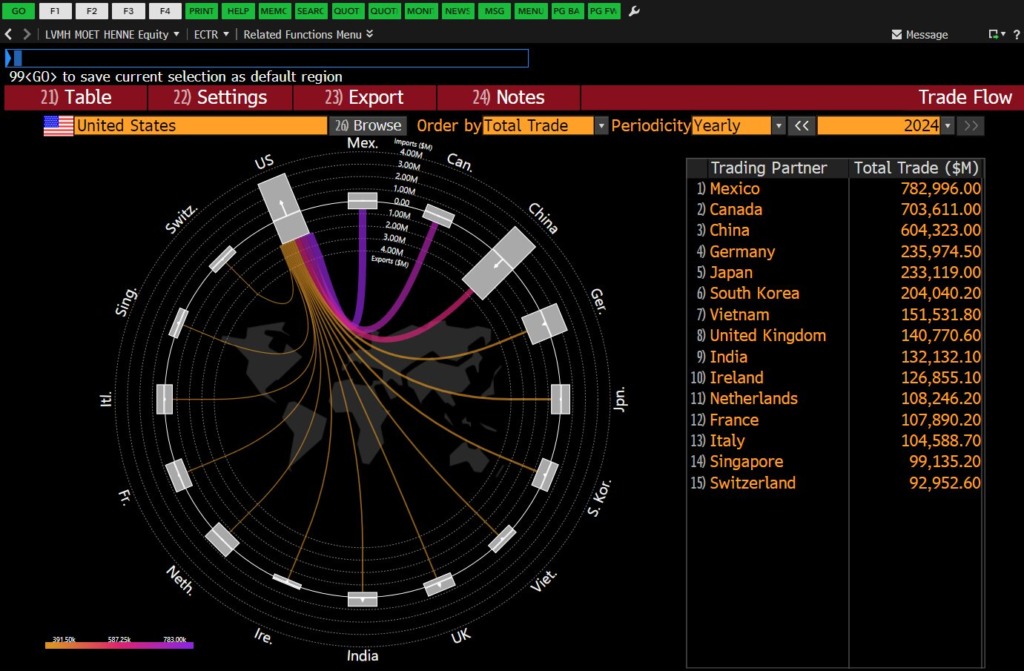
We can see from here that the US’s biggest trading partner in 2024 was Mexico, with Canada close behind. Summary data is displayed on the right hand side.
If you hover over any particular trade flow, Bloomberg will display relevant data.
Customising your analysis:
- ECTR’s default display is the interactive trade flow map. If you would prefer to view figures, click on ‘Table’ on the red menu bar. (To return to the visual display, select ‘Graph’).
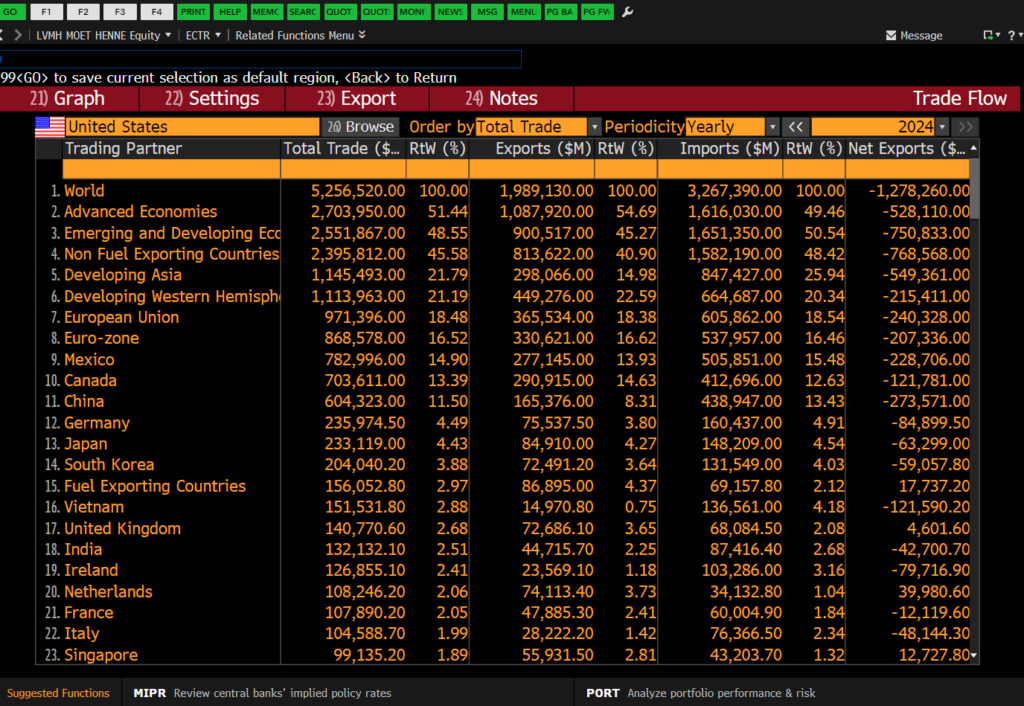
- To focus on another country, type the country name in the orange country box – or use the grey ‘Browse’ button..

- In the top right orange box, you can also set the year for your analysis. Use this option to compare a previous year’s trade.
- The trade map will automatically display figures for total trade. If you are interested in an individual variable such as exports or imports, use the drop-down ‘Order by’ menu to make your selection.
- Select the ‘Export’ option on the red menu bar to send figures directly to Excel.
If you have any questions on Bloomberg on or any of our electronic business resources, please contact the Library.
Feature image from Pixabay. Available at: https://cdn.pixabay.com/photo/2018/03/15/16/11/background-3228704_960_720.jpg

Categories & Tags:
Leave a comment on this post:
You might also like…
Introducing… Bloomberg Trade Flows
Are you interested in world trade flows? Would it be useful to know which nations are your country's major trading partners? If so, the Bloomberg terminal has a rather nifty function where you can view ...

Cranfield alumni voyage to the International Space Station
Seeing our alumni reach the International Space Station (ISS) has a ripple effect that extends far beyond the space sector. For school students questioning whether science is “for them”, for undergraduates weighing their next ...

From classroom to cockpit: What’s next after Cranfield
The Air Transport Management MSc isn’t just about learning theory — it’s about preparing for a career in the aviation industry. Adit shares his dream job, insights from classmates, and advice for prospective students. ...

Setting up a shared group folder in a reference manager
Many of our students are now busy working on their group projects. One easy way to share references amongst a group is to set up group folders in a reference manager like Mendeley or Zotero. ...

Company codes – CUSIP, SEDOL, ISIN…. What do they mean and how can you use them in our Library resources?
As you use our many finance resources, you will probably notice unique company identifiers which may be codes or symbols. It is worth spending some time getting to know what these are and which resources ...
Supporting careers in defence through specialist education
As a materials engineer by background, I have always been drawn to fields where technical expertise directly shapes real‑world outcomes. Few sectors exemplify this better than defence. Engineering careers in defence sit at the ...