


How do I reference… a table of data from multiple sources?
24/04/2025

If you have read our previous APA7 post on Referencing … tables, you will know how to cite a table of data taken from another source, but when you are creating a new table which incorporates data gathered from different sources, you must cite all the sources used. You can do this by following one of the approaches below:
- The table caption appears above the table e.g. Table 1: Title of table
- The source information appears underneath the table e.g. (Source: British Airways Plc, 2019; 2023)
- If you want to indicate precisely what data has been taken from where, you can add superscript lowercase letters to the cells of the table and then provide a corresponding note beneath the table, as per the following example, Table 1:
Table 1: Title of Table
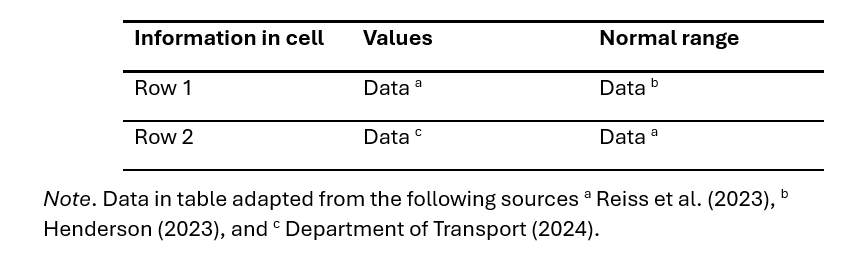
The above example is for the APA7 referencing style. If you are using NLM referencing, add a corresponding note and use the citation numbers as cited in your main text:
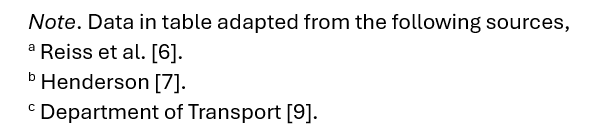
References which are only cited in the table and not in your main text should be numbered according to the physical location of the table in relation to the text.
If your supervisor or lecturer advises you to include in-text citations into the table itself or if the inclusion of lowercase letters could cause confusion (for instance if using mathematical equations) these can be placed within a separate column or row with an appropriate heading, as per the example, Table 2.
Table 2: Title of Table
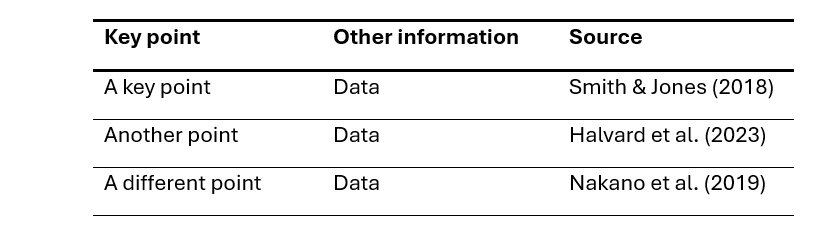
In each case you should also include the full bibliographic details of each source in your reference list at the end of your work in the referencing style you are using. You do not need to include any superscript letters as these are only relevant within the table.
Please note: Cranfield supports two different referencing styles – APA7 (Author-date) and Numbered (NLM). Please make sure you use the style preferred by your supervisor or lecturer. If you have any questions about referencing, please contact the Library.
Feature image from Pixabay. Available at: https://pixabay.com/photos/student-typing-keyboard-text-woman-849822/

Categories & Tags:
Leave a comment on this post:
You might also like…
Keen to develop your study skills?
Alongside the technical skills and academic knowledge that you will gain on your course, as a Cranfield student you have the opportunity to develop a range of other skills that can enhance your learning experience. ...
The V-conomy: powering the sixth wave of global economic growth
The world could be on the verge of a major surge in economic growth and development, driven by the convergence of AI and clean energy technology. Waiting to ride the K-wave The Russian ...

Need help using the Python programming language?
We know some of our students are currently trying to learn Python, so we wanted to make you aware of some great LinkedIn Learning videos that can help. But don't you have to pay for ...

What does it really take to become a Chevening Scholar?
Say “Turkmenistan” to most people and you’ll get a blank look. That was true when I left Ashgabat for the UK to study an MSc in Logistics and Supply Chain Management at Cranfield University ...

Get a head start on referencing and plagiarism
We offer a module on Referencing And Avoiding Plagiarism which you can find on your Canvas dashboard. It explains the role and importance of citing references and how to incorporate the work of other authors ...

How Cranfield shaped my journey as an Aerospace Engineer
If I'm being specific about the moment it clicked, it was reading a paper called "On the Role and Challenges of Computational Fluid Dynamics (CFD) in the Aerospace Industry" by two Boeing engineers, P. ...
Comments are closed.