


Company codes – CUSIP, SEDOL, ISIN…. What do they mean and how can you use them in our Library resources?
12/02/2026

As you use our many finance resources, you will probably notice unique company identifiers which may be codes or symbols. It is worth spending some time getting to know what these are and which resources use which codes and symbols, as they can help you to move lists of companies – almost effortlessly – between different financial databases.
In our company codes table below, you will find a list of Library finance resources and which codes/symbols are available within each. In some cases, the codes/symbols available for a company depend on the geographical location of the company/equity, e.g. American companies will usually have a CUSIP but not a SEDOL.
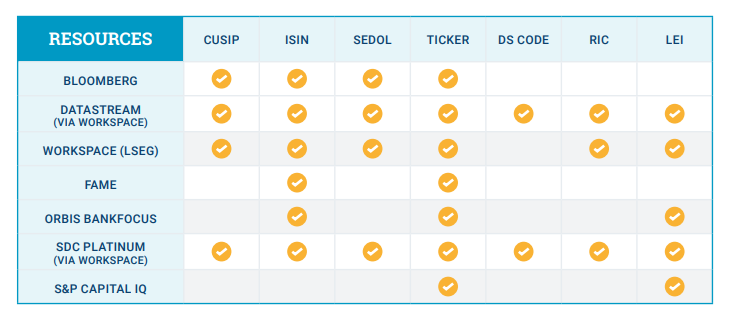
Please see below for the most commonly used codes and symbols and their definitions:
CUSIP – an acronym of Committee on Uniform Security Identification Procedures is a 6, 8 or 9-digit alphanumeric code, mainly used in the US and Canada. The codes are created by the American Banking Association and are operated by CUSIP Global Services.
ISIN – uniquely identifies a security – it is a 12-character alphanumeric code used worldwide. Most financial data providers, e.g. LSEG, Bloomberg, Moody’s (FAME & BankFocus), usually include an ISIN number.
SEDOL – stands for Stock Exchange Daily Official List – they are 7 characters in length, a 6-place alphanumeric code plus a trailing check digit. These numbers are assigned to securities by the London Stock Exchange. They serve as the National Securities Identifying Number, so form part of the securities ISIN number as well.
TICKER – or stock symbol – this is used to identify publicly traded shares of a particular stock on a particular market. It may be letters, numbers or a combination of both.
DATASTREAM CODE (DS CODE) – the unique six-digit identification code allocated by Datastream.
RIC – Reuters instrument code used in Workspace (LSEG) to identify companies.
LEI – Legal Entity Identifier is a 20-character alphanumeric code. The code format follows an ISO standard with governance overseen by the Global Legal Entity Identifier Foundation (GLEIF). Its purpose is to uniquely identify parties involved in financial transactions worldwide.
If using Workspace (LSEG) you can see all the company codes by selecting the Overview – Business information from the company profile screen, then viewing the codes and schemes. In Bloomberg, take a look at the equity description (DES) share information pages.
If you have any questions about how these can be used, please contact the Library.
Feature image from Pixabay. Available at: https://cdn.pixabay.com/photo/2016/11/27/21/42/stock-1863880_960_720.jpg

Categories & Tags:
Leave a comment on this post:
You might also like…

Cranfield: an environment where innovation thrives
The latest Knowledge Exchange Framework rankings from UK Research and Innovation (UKRI) gives an insight into the real and meaningful impact that UK universities have. The seven categories that make up KEF6 cover everything ...

How Cranfield accelerated my career in Logistics and Supply Chain Management
After graduating from the MSc in Logistics and Supply Chain Management at Cranfield University, I've been reflecting on the experiences that made my journey so valuable and the impact it has had on my ...

Mendeley: a powerful tool to organise and manage your references
Are you looking for a way to manage your references, create in-text citations and reference lists for your assignments or thesis? If so, you may wish to consider using Mendeley. What is it? Mendeley is ...

Keen to develop your study skills?
Alongside the technical skills and academic knowledge that you will gain on your course, as a Cranfield student you have the opportunity to develop a range of other skills that can enhance your learning experience. ...

The V-conomy: powering the sixth wave of global economic growth
The world could be on the verge of a major surge in economic growth and development, driven by the convergence of AI and clean energy technology. Waiting to ride the K-wave The Russian ...

Need help using the Python programming language?
We know some of our students are currently trying to learn Python, so we wanted to make you aware of some great LinkedIn Learning videos that can help. But don't you have to pay for ...
Comments are closed.