


Adding documents to your Mendeley account
27/03/2025

To make the most of a Mendeley account, it is useful to create and maintain a ‘Library’ of references. You can add references and documents to this Library in a number of ways:
1) Drag and Drop PDF files
2) Import RIS (.ris) files from library resources such as Library Search and Scopus
3) Import a file or folder
4) Add references manually
5) Via the Mendeley Web Importer
Please see below for more information on each method:
1) Drag and drop a PDF file into your Mendeley Library.
Mendeley will scan for metadata and create a record within your library.
2) Importing RIS files from library resources
Many of our library resources such as Business Source Complete and Scopus offer the option to export references in a format that can be imported directly into your Mendeley Library. Look for options such as Export, Download and Save and look for the file RIS (.ris) format.
When importing the references into Mendeley use > + Add references >Import file(s):
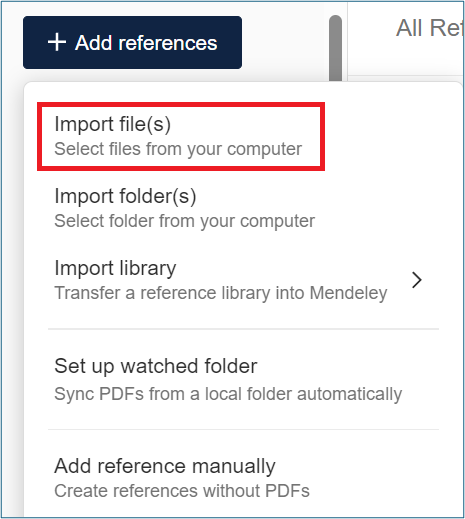
‘Import file(s)’ screen
Check that the imported references are correct by clicking on individual entries. Pay particular attention to bibliographic information, words in ALL CAPITALS and the reference type ‘unspecified’:
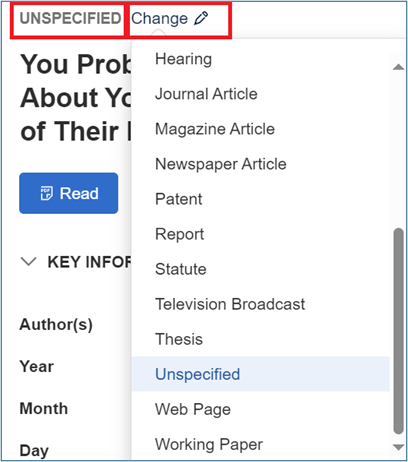
‘UNSPECIFIED’ screen
If you find an entry ‘Unspecified’, you can use the ‘Change’ option to modify this.
3) Importing a file or folder
You can import a single PDF file or a folder of PDF files directly into Mendeley. Use
> + Add references >Import file(s) or
> + Add references >Import folder(s)
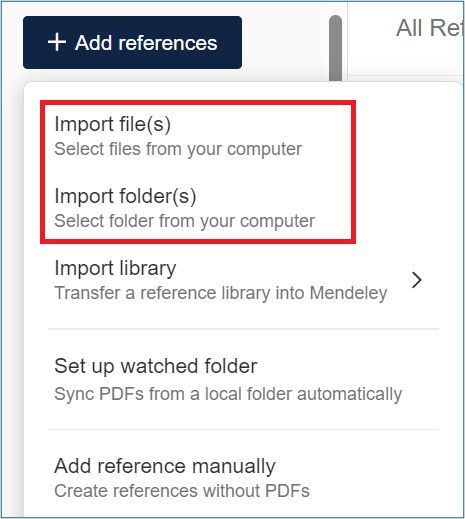
‘Import file(s)’ and ‘Import folder(s)’ screen
Or just drag and drop.
As mentioned above, check the quality of the resulting references.
Note: Do not add confidential documents to Mendeley as they may be shared with the community
4) Adding references manually
To add a reference manually, look for > + Add references >Add reference manually
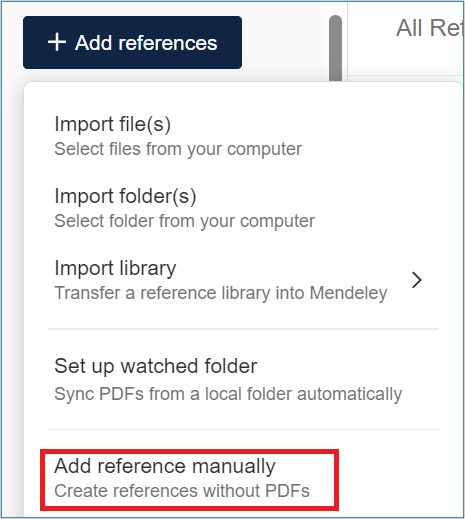
‘Add reference manually’ screen
Enter the information that you have into the next window.
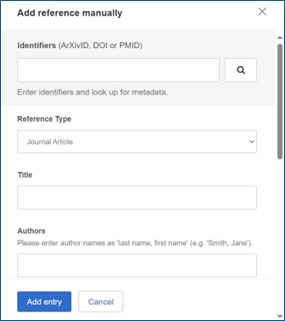
‘Add entry’ screen
If you have a Digital Object Identifier (DOI), enter this into the top box, and then click on the magnifying glass symbol.
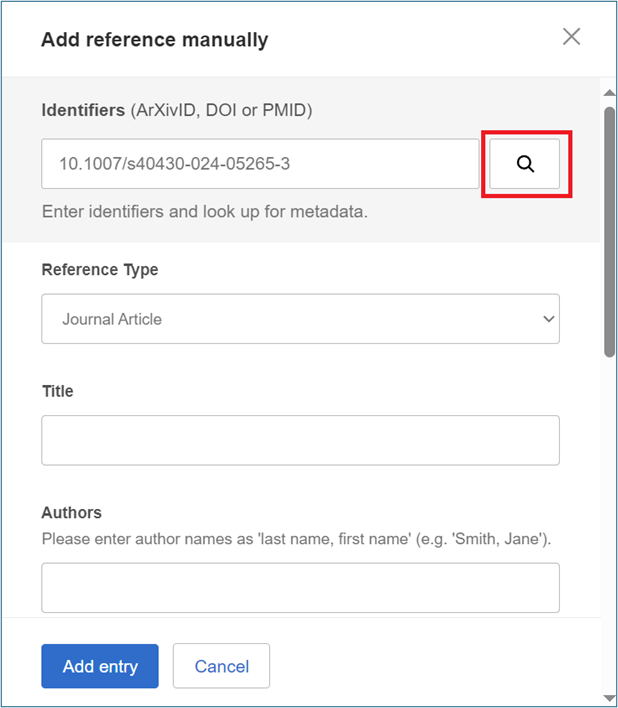
‘Add reference manually’ screen
The fields will be populated. Click ‘Add entry’ to add the reference to your library.
If you do not have a DOI, make sure to choose the correct ‘Reference Type’ eg journal article, book etc. and take care when completing the ‘Author’ field. Use a separate line for each author. Personal authors are entered in the format Last name, First name and corporate authors are entered in full followed by a comma e.g. Cranfield University,.
5) Via the Mendeley Web Importer.
Mendeley Web Importer is a browser extension that captures the details of web pages or online documents and creates references for them within your Mendeley Library. There are some performance issues with this extension.
If you have any questions about Mendeley or any other library questions, please contact library@cranfield.ac.uk.
Feature image from Pixabay. Available at: https://pixabay.com/photos/student-typing-keyboard-text-woman-849822/

Categories & Tags:
Leave a comment on this post:
You might also like…

Need help using the Python programming language?
We know some of our students are currently trying to learn Python, so we wanted to make you aware of some great LinkedIn Learning videos that can help. But don't you have to pay for ...

What does it really take to become a Chevening Scholar?
Say “Turkmenistan” to most people and you’ll get a blank look. That was true when I left Ashgabat for the UK to study an MSc in Logistics and Supply Chain Management at Cranfield University ...

The V-conomy: powering the sixth wave of global economic growth
The world could be on the verge of a major surge in economic growth and development, driven by the convergence of AI and clean energy technology. Waiting to ride the K-wave The Russian ...

Get a head start on referencing and plagiarism
We offer a module on Referencing And Avoiding Plagiarism which you can find on your Canvas dashboard. It explains the role and importance of citing references and how to incorporate the work of other authors ...

How Cranfield shaped my journey as an Aerospace Engineer
If I'm being specific about the moment it clicked, it was reading a paper called "On the Role and Challenges of Computational Fluid Dynamics (CFD) in the Aerospace Industry" by two Boeing engineers, P. ...

Introducing Kings Norton Library
Welcome to all our new students! We are looking forward to meeting you soon. You will find Kings Norton Library in the centre of the Cranfield campus, and it is open 24/7 to all staff ...
Comments are closed.