

Researching… M&A
06/12/2024

Mergers and acquisitions are constant headline-makers, from high-profile takeovers to game-changing mergers. But if you need to go beyond the headlines – whether for a coursework assignment, thesis, or just out of curiosity – where do you start? This guide will walk you through the best of our resources for M&A research.
Start with the basics: What do you want to know?
Before diving in, it’s worth asking yourself what kind of information you’re after. Are you interested in:
- Details about a specific deal?
- Trends in M&A activity over time?
- Industry-specific M&A insights?
- The financial impact of deals?
Different resources specialise in different aspects, so knowing what you need will help guide guide your research.
Your go-to resources for M&A research:
Capital IQ
Capital IQ is your starting point for in-depth M&A research. It offers a wealth of deal-specific information alongside financial data on companies involved.
How to Use It:
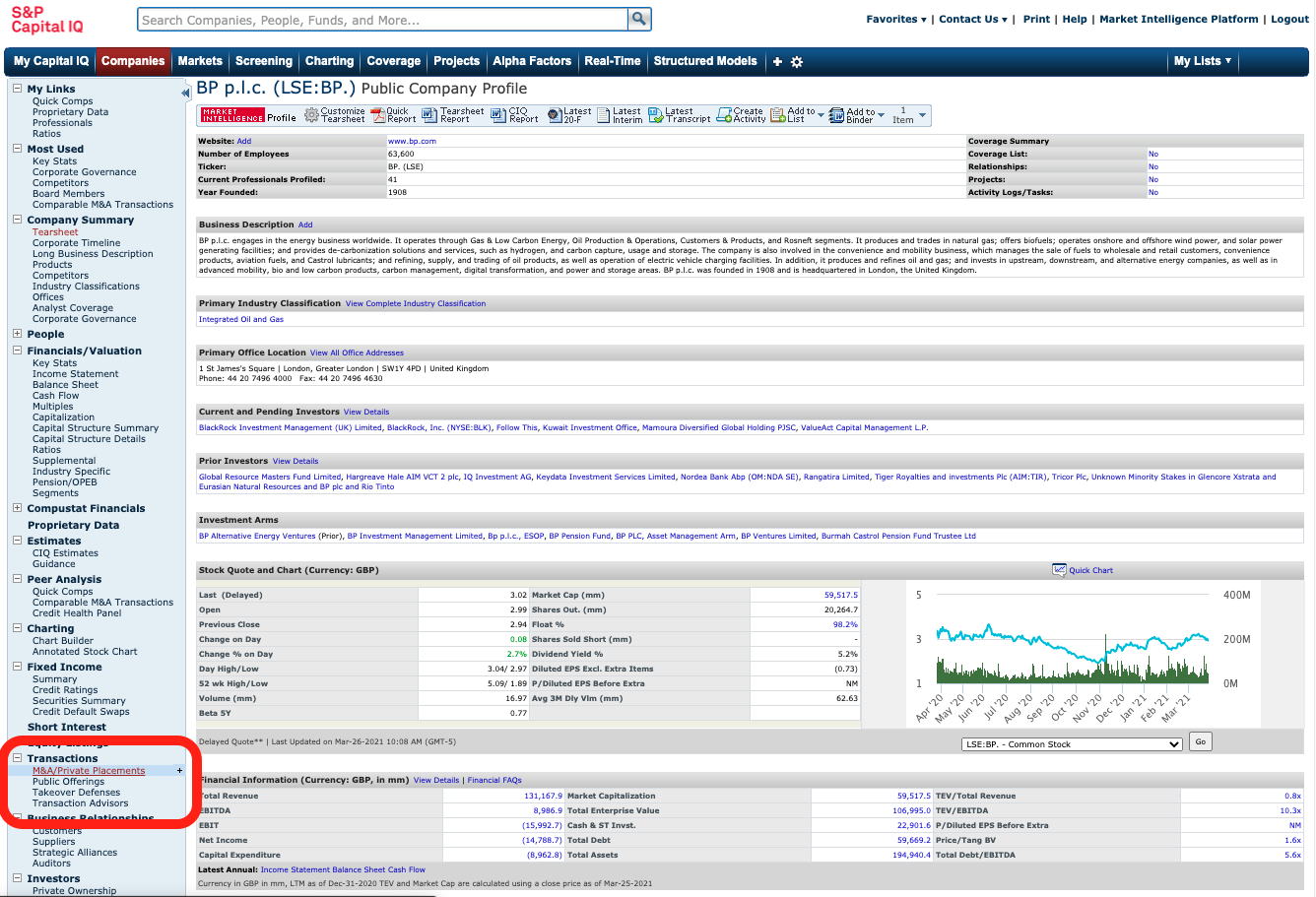
- Find deals for a specific company:
- Search for your target company in the search bar.
- From the company overview page, (example screenshot below) navigate to ‘Transactions’ in the left-hand menu.
- Select ‘M&A/Private Placements’ for detailed deal information, including terms, valuations, and counterparties.
- Search by deal criteria:
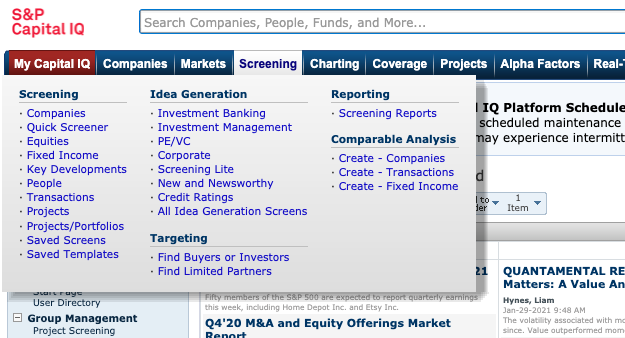
- Go to the ‘Screening’ tab in the top navigation menu (example screenshot below).
- Select ‘Transactions’ and apply filters like deal size, date range, industry, or geographic region. Remember to use the ‘M&A Details’ menu to specify your required M&A criteria.
Why use Capital IQ:
Capital IQ combines historical deal data (back to the 1980s) with company financials, making it perfect for understanding individual transactions or broader trends.
Bloomberg
Bloomberg is another powerhouse for tracking and analysing M&A deals in real time. It’s particularly useful for spotting current activity and trends.
How to use it:
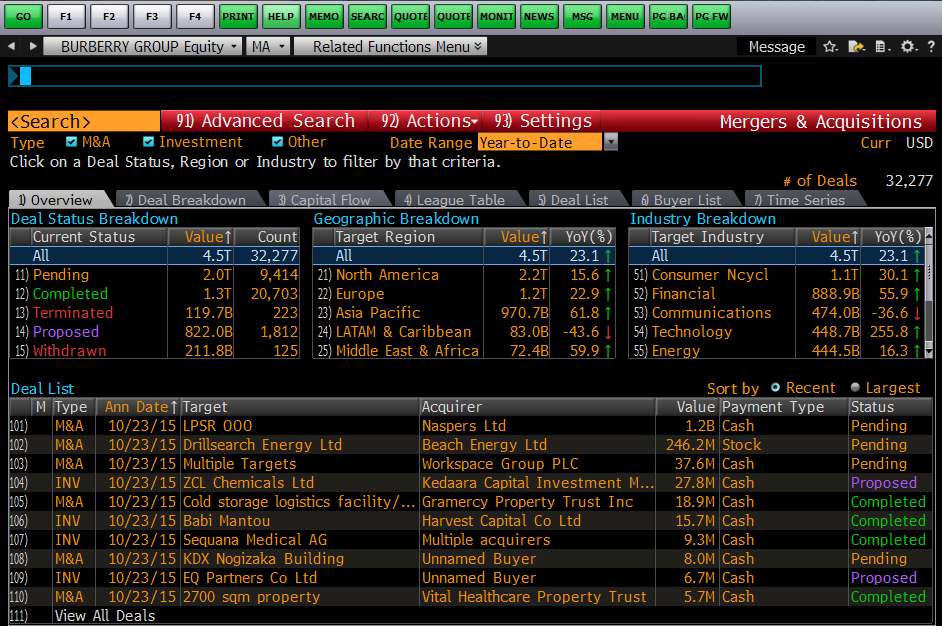
- On a Bloomberg terminal, type MA <GO> in the blue search bar to access M&A data.
- Use filters to explore deals by geography, industry, or transaction type.
- Check out related news, share price charts, and deal rumours to get the full context.
Why use it:
Bloomberg excels in real-time data and visualization tools. The charting function is excellent for identifying trends and comparing transactions.
(See Bloomberg basics for some background information on Bloomberg and Creating your account on Bloomberg if you decide you want to use this resource.)
Workspace (LSEG)
Workspace is ideal for market-level insights and financial data. Its integration with SDC Platinum makes it a powerful tool for large-scale analysis.
How to use it:
- If you haven’t already done so, register for Workspace access. More information is available here.
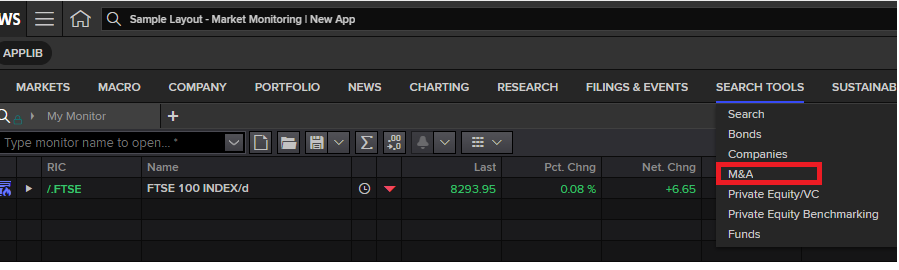
- Navigate to the M&A section under the ‘Search Tools’ tab (see screenshot below).
- Apply filters like industry, region, or time frame to analyse deal flow or generate reports.
- For historical data or deeper analysis, use the linked SDC Platinum platform.
Why use it:
Workspace offers a comprehensive view of market activity, making it especially useful for broader analyses of M&A trends across industries or geographies.
SDC Platinum
If your research involves crunching numbers on large datasets—like identifying trends over decades or comparing thousands of deal – SDC Platinum is your best bet.
How to use it:
- Access SDC Platinum by adding it to your subscription when you sign up for Workspace.
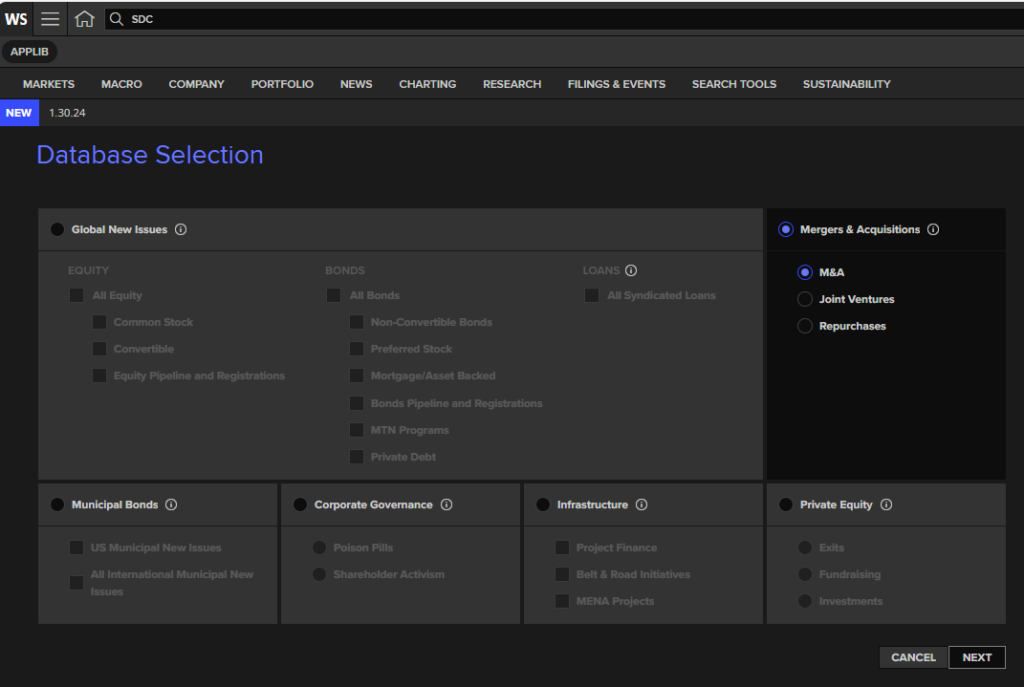
- Once you are in Workspace, type SDC in the Workspace search bar.
- Open a ‘New Session’.
- Choose ‘Mergers and Acquisitions’ to find historical deal data going back to the 1950s (see screenshot below).
- Export datasets for statistical analysis in tools like Excel.
Why use it:
SDC Platinum is the most comprehensive database for M&A research, perfect for research projects requiring extensive historical data.
Factiva
Don’t forget the power of the press! Factiva aggregates news from global sources, making it invaluable for understanding the context around a deal.
How to use it:
- Search for a company or deal in the Factiva database.
- Use advanced filters to limit results by publication date, region, or industry.
- Look for news about deal announcements, regulatory hurdles, and market reactions.
Why use it:
Factiva adds depth to your research, offering perspectives from media coverage you won’t find in financial databases.
Industry reports and analyst insights
Want to understand the broader market environment? Dive into our library’s collection of reports from sources like IBISWorld and BMI Research for industry-specific analysis. You may also find some brokers’ reports in journal database ProQuest One Business.
How to use them:
- Use IBISWorld for accessible overviews of industry performance and market conditions.
- BMI provides deeper insights into risks, opportunities, and forecasts in various sectors.
- Brokers’ (and analysts’) reports are essential reading from the point where a deal was rumoured until well after the completion date to help you answer questions like: what else was happening at that time? Was there interest from other companies? Bloomberg and ProQuest One Business are good sources here.
Why use them:
These resources are perfect for understanding the context in which M&A deals occur—what motivates them, what risks they face, and what they mean for the industry.
Tips for successful M&A research
- Combine resources: No single tool has it all! Use Capital IQ for deal specifics, Bloomberg for live updates, and Factiva for news coverage.
- Ask for help: Our librarians are here to guide you. Struggling with screening criteria or data exports? We can help you navigate the tools.
- Stay organized: Keep track of your searches, filters, and sources so you can replicate or refine them later.
Ready to get started?
All these resources are available via our Financial resources page. Still not sure where to start, or need help with one of our resources? You can contact us here.
Happy researching!
Feature image from Pixabay. Available at: https://cdn.pixabay.com/photo/2015/11/26/07/47/hands-1063442_960_720.jpg.

Categories & Tags:
Leave a comment on this post:
You might also like…

Setting your research on the right course: Four questions every researcher should ask
Whether you are just beginning your doctoral journey or are already well into your research career, successful research rarely happens by accident. Like any successful mission, it depends on good planning, informed decisions, and getting ...

5 budgeting mistakes students make (and how to avoid them)
Good financial planning isn't about how much money you have. It's about the habits you build. We asked Dr Lakshmy Subramanian, Course Director for the Banking, Economics and Finance MSc, about the budgeting mistakes ...

Finding your reading materials
Use Library Search Library Search is the first place to start when you are trying to find academic sources for your work. This is the search box on the library website homepage. It allows you ...

Formula 1 was the dream and Cranfield was the conduit
I still remember the exact moment Formula 1 (F1) got its hooks into me. I was in my first year of an aerospace undergraduate engineering degree when I watched a video about the sport ...

Introducing Barrington Library
Welcome to all our new students! Barrington Library supports all the students and staff at Cranfield Defence and Security on the Shrivenham site. We are looking forward to meeting you all soon, in person or ...


About to start your journey at Cranfield? We’re here to help!
Congratulations on accepting your offer to study at Cranfield! If you’re keen to get a head start before your course begins, our Library Services team is here to support you every step of the way. ...
Comments are closed.