


Macroeconomic metrics – How to find Gross Domestic Product (GDP) and Gross Value Added (GVA) data
14/08/2025

There is a wealth of information on a range of global macroeconomic topics within our Library resources. This information ranges from statistics and reports to forecasts, insight, analysis and metrics. Two commonly used macroeconomic metrics are Gross Domestic Product (GDP) and Gross Value Added (GVA). They both measure the value of goods and services produced over a given period. GDP is a national level measure; GVA can be collected at entity, region, industry or sector level.
- Gross Domestic Product can be used as a measure of the health of a nation’s economy over time and it can be used to compare the economies of different nations.
- Gross Value Added can be used as a measure of the value to an economy of a single entity, region, industry or sector, for example manufacturing within the United Kingdom.
Of the resources listed on our Economic data and analysis page , we recommend Passport as the best place to start your search for information regarding GDP or GVA. For GVA specifically, Passport has the most comprehensive coverage.
Finding Gross Domestic Product (GDP) within Passport
1. From the headings at the top of the screen, choose ‘Economies’ and then ‘Economy, Finance and Trade’.
2. From the drop down select GDP and Go.
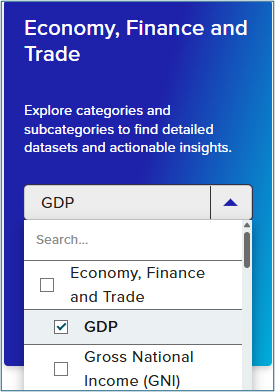
3. Check that the +GDP radio button is selected and then go to the ‘Select geographies’ tab
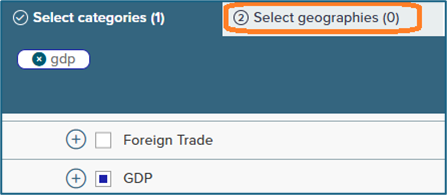
4. Use the menu or the search box to find the nation of interest.
5. To see the results of your search, click the radio button next to the nation of interest – in the screenshot below the United Kingdom has been selected – and then click on ‘View results’, top right.
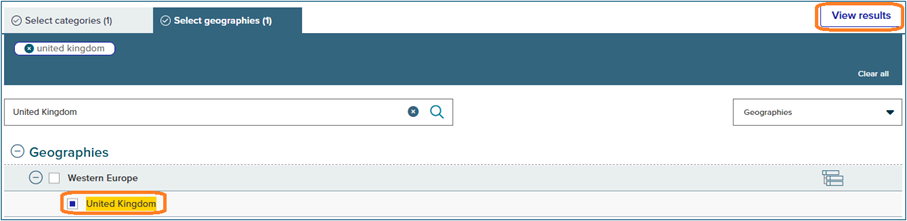
6. On the next screen, choose ‘View full data set’
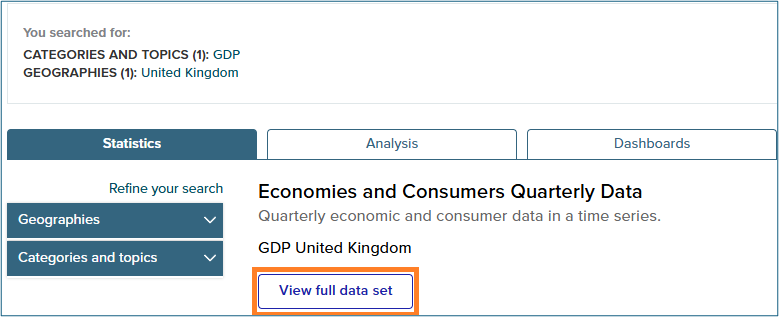
7. On the data set screen, it is usually possible to modify the currency and date range displayed. The data can also be downloaded.

Finding Gross Value Added (GVA) by sector within Passport
Follow steps 1-2 above and then…
3. On the next screen, start expanding the menus using the + signs and the radio buttons. Look for + GDP, +GDP (Production Approach), +Gross Value Added
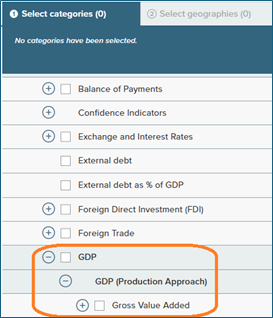
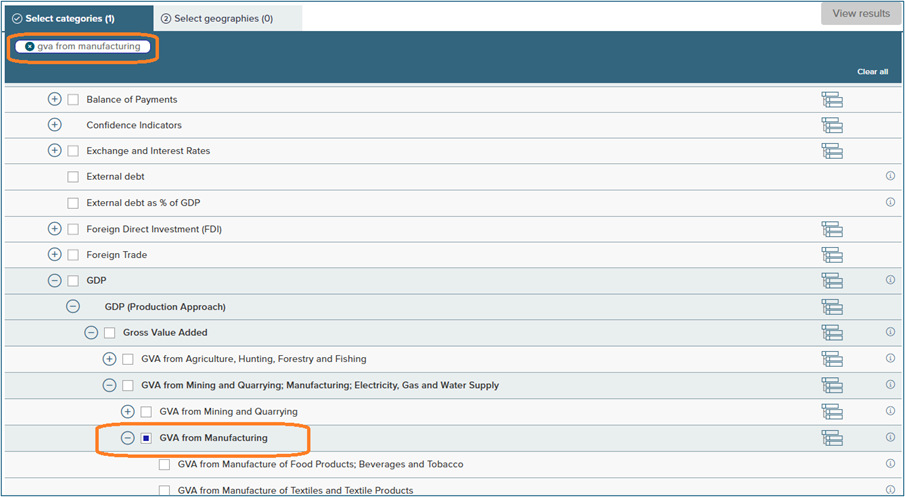
4. Continue using the menus and the + signs until you find the sector in which you are interested and then click the relevant radio button.
In the example in the screenshot below ‘GVA from Mining and Quarrying; Manufacturing; Electricity, Gas and Water Supply’ and then ‘GVA from manufacturing’ have been selected.
Notice that ‘gva from manufacturing’ has been added to the ‘Select categories’ tab. If a category that you do not wish to explore – such as GDP from the previous example – appears in that area, click on the x to remove it. Further refinement to specific manufacturing sectors such as food, textiles, wood etc. was also possible.
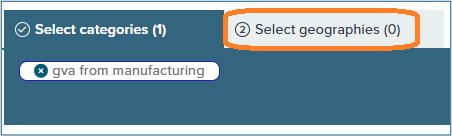
5. Go to the ‘Select geographies’ tab
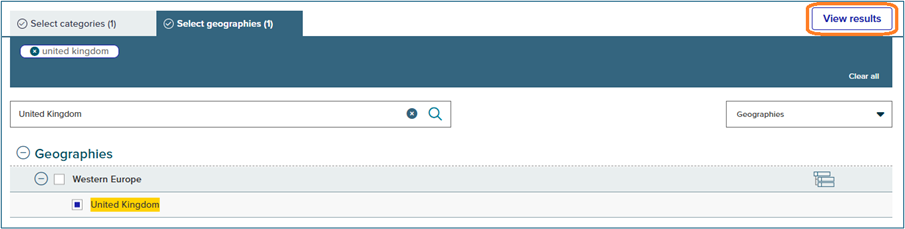
6. Use the menu or the search box to find the nation of interest.
7. To see the results of your search, click the radio button next to the geography of choice and then click ‘View results’. In the screenshot below the United Kingdom has been selected.
8. On the next screen, choose ‘View Full Data Set’.
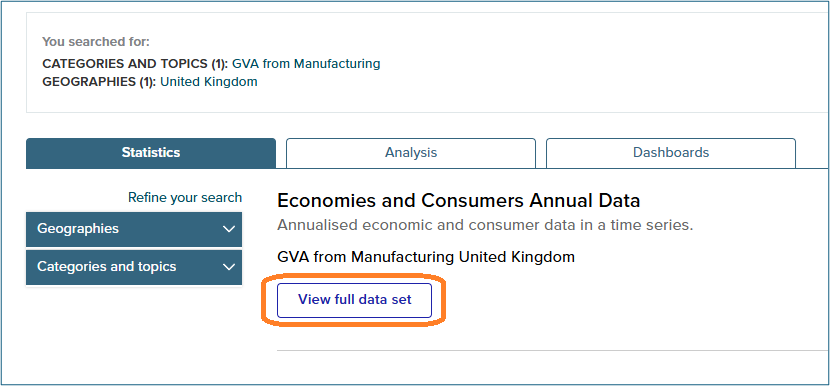
9. On the data set screen, it is usually possible to modify the currency and date range displayed. The data can also be downloaded.

GDP data, and some GVA data, is also available within Statista and BMI. We recommend using the ‘Search Statistics’ search box or the new ‘Research AI’ tool within Statista. Within BMI we recommend using the ‘Search Geography, Service and Research’ box.
If you have any questions about the above, or any other library resource, please contact us.

Categories & Tags:
Leave a comment on this post:
You might also like…

Cranfield: an environment where innovation thrives
The latest Knowledge Exchange Framework rankings from UK Research and Innovation (UKRI) gives an insight into the real and meaningful impact that UK universities have. The seven categories that make up KEF6 cover everything ...

How Cranfield accelerated my career in Logistics and Supply Chain Management
After graduating from the MSc in Logistics and Supply Chain Management at Cranfield University, I've been reflecting on the experiences that made my journey so valuable and the impact it has had on my ...

Mendeley: a powerful tool to organise and manage your references
Are you looking for a way to manage your references, create in-text citations and reference lists for your assignments or thesis? If so, you may wish to consider using Mendeley. What is it? Mendeley is ...

Keen to develop your study skills?
Alongside the technical skills and academic knowledge that you will gain on your course, as a Cranfield student you have the opportunity to develop a range of other skills that can enhance your learning experience. ...

The V-conomy: powering the sixth wave of global economic growth
The world could be on the verge of a major surge in economic growth and development, driven by the convergence of AI and clean energy technology. Waiting to ride the K-wave The Russian ...

Need help using the Python programming language?
We know some of our students are currently trying to learn Python, so we wanted to make you aware of some great LinkedIn Learning videos that can help. But don't you have to pay for ...
Comments are closed.