


Unlock your full searching potential with a personal account in EBSCO or ProQuest
06/05/2025

Some of our journal-searching resources include features that are only available when you have registered for an individual account. These features can help you to:
- Save time
- Document your work
- Keep up to date.
Sound interesting? Keep reading!
Save Time
You can save time by automating some aspects of your searching. If you find a search that produces particularly valuable results, try saving that search and setting up a search alert. When you set up a search alert you will be emailed links to any new material that matches your search. This means it’s not necessary to re-run your searches. It’s an excellent and efficient way of making sure you have the most up-to-date material.
Document your work
Sometimes it’s useful to be able to save and return to searches or content that you have found particularly useful. This functionality is usually only available when using a personal account.
In ProQuest One Business ‘…you can save, manage, and organize the content and supporting materials you find and create…’
You can ‘Create folders to save and manage documents you find relevant to your research.’
Here’s an overview of the functionality available.
In Business Source Complete (EBSCO) you can save searches to the ‘dashboard’. To save searches permanently you must be signed in to your personal MyEBSCO account.
Here’s some guidance on saving searches.
Here’s some guidance on creating and managing journal alerts.
Here’s some guidance on creating and managing search alerts.
Keep up to date
You can keep up to date by setting up alerts. Alerts are emails that contain links to content such as:
- your successful searches
- journal and publication tables of contents.
Both Business Source Complete (EBSCO) and ProQuest One Business have this functionality.
Is there anything else that I might find useful?
ProQuest One Business also offers RSS feeds and you can export up to 20,000 results at any one time – really useful if you are doing a structured or systematic literature review.
Interested?
Have we persuaded you that registering for your own account is worthwhile? If so, here’s how to do it…
Within ProQuest One Business it is necessary to register for a ‘My Research account’:
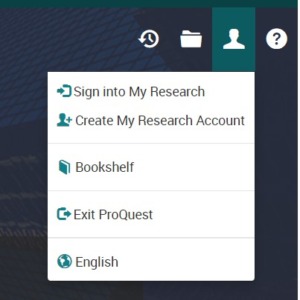
Create My Research Account
Within Business Source Complete (EBSCO) these features are available in your personal MyEBSCO account.

MyEBSCO
You may need to sign in. Once signed in you’ll see a Cranfield logo:
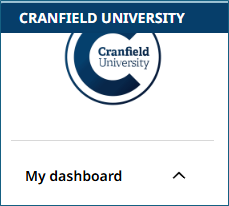
Logged in to MyEBSCO
If you cannot see this area, here’s how to create and manage a MyEBSCO account. Let us know how you get on with your own accounts!
Image by Mohamed_hassan on Pixabay https://pixabay.com/vectors/calendar-agenda-online-mark-7041843/

Categories & Tags:
Leave a comment on this post:
You might also like…

Keen to develop your study skills?
Alongside the technical skills and academic knowledge that you will gain on your course, as a Cranfield student you have the opportunity to develop a range of other skills that can enhance your learning experience. ...

The V-conomy: powering the sixth wave of global economic growth
The world could be on the verge of a major surge in economic growth and development, driven by the convergence of AI and clean energy technology. Waiting to ride the K-wave The Russian ...

Need help using the Python programming language?
We know some of our students are currently trying to learn Python, so we wanted to make you aware of some great LinkedIn Learning videos that can help. But don't you have to pay for ...

What does it really take to become a Chevening Scholar?
Say “Turkmenistan” to most people and you’ll get a blank look. That was true when I left Ashgabat for the UK to study an MSc in Logistics and Supply Chain Management at Cranfield University ...

Get a head start on referencing and plagiarism
We offer a module on Referencing And Avoiding Plagiarism which you can find on your Canvas dashboard. It explains the role and importance of citing references and how to incorporate the work of other authors ...

How Cranfield shaped my journey as an Aerospace Engineer
If I'm being specific about the moment it clicked, it was reading a paper called "On the Role and Challenges of Computational Fluid Dynamics (CFD) in the Aerospace Industry" by two Boeing engineers, P. ...
Comments are closed.