


How do I reference my lecture notes… in the APA7 style?
05/08/2022

So you want to use an example from your lecture notes in your assignment? You might want to reuse a diagram or infographic that your tutor has created – or just replicate some text from their slides. Here’s how to do this in the APA7 style.
So, first of all, what information do you need in the reference?
- Author – Surname, Initials.
- (Date of publication).
- Title: with subtitle separated by a colon and written in italics. Follow this with a description of the work in square brackets, e.g. [PowerPoint presentation].
- Platform or website where the materials are located.
- URL – Include a URL if the materials are available online (but only include if the material has come from a platform that will be available to the reader of your work).
And how should my reference look?
Here’s an example of a reference for some lecture notes from the MBA ‘Economics of Business and Strategy’ module.
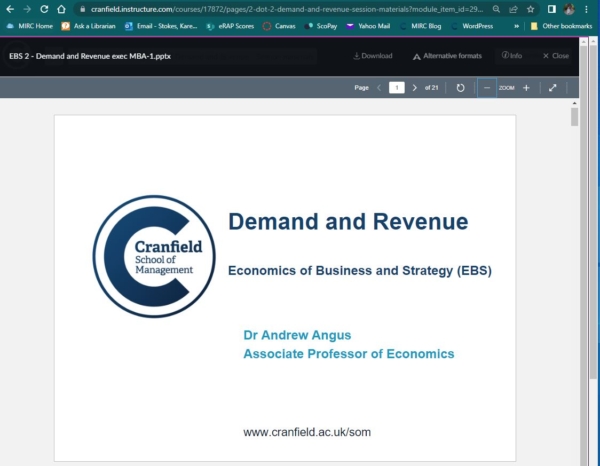
Angus, A. (2022). Demand and revenue [PowerPoint slides]. Canvas Cranfield. https://cranfield.instructure.com/courses/17872/pages/2-dot-2-demand-and-revenue-session-materials?module_item_id=296896
Always remember to separate each element in your reference with a full stop and a space – and to format APA7 references with a hanging indent.
Please bear in mind that if your tutor has uploaded any pre-published documents to your VLE, they should be referenced in their own format – whether that be as a book chapter, an article, report, etc. Please check our APA7 referencing guide if you are unsure. The format above is solely for slides and lecture materials.
For all your referencing questions – please contact your Library.
Please note: Cranfield supports two different referencing styles – APA7 (Author-date) and Numbered (NLM). Please make sure you use the style preferred by your supervisor or lecturer. The advice above relates only to the APA7 style. If you have any questions about referencing, please contact the Library.
Feature image from Pixabay. Available at: https://pixabay.com/photos/student-typing-keyboard-text-woman-849822/

Categories & Tags:
Leave a comment on this post:
You might also like…

5 budgeting mistakes students make (and how to avoid them)
Good financial planning isn't about how much money you have. It's about the habits you build. We asked Dr Lakshmy Subramanian, Course Director for the Banking, Economics and Finance MSc, about the budgeting mistakes ...
Finding your reading materials
Use Library Search Library Search is the first place to start when you are trying to find academic sources for your work. This is the search box on the library website homepage. It allows you ...

Formula 1 was the dream and Cranfield was the conduit
I still remember the exact moment Formula 1 (F1) got its hooks into me. I was in my first year of an aerospace undergraduate engineering degree when I watched a video about the sport ...
Introducing Barrington Library
Welcome to all our new students! Barrington Library supports all the students and staff at Cranfield Defence and Security on the Shrivenham site. We are looking forward to meeting you all soon, in person or ...

About to start your journey at Cranfield? We’re here to help!
Congratulations on accepting your offer to study at Cranfield! If you’re keen to get a head start before your course begins, our Library Services team is here to support you every step of the way. ...

Bank holiday hours for Library Services: Monday 31 August
Library Services staff will be taking a break on Monday 31 August for the bank holiday. You will still be able to access all the resources and help you need via our library website. The 24/7 ...