


Using Watch Folders in Mendeley
25/02/2025

Looking for a quick and easy way of adding documents to your Mendeley library? Wouldn’t it be great if you could add PDFs to a folder on your computer and these could be automatically imported into Mendeley? Well, actually you can!
By using a ‘watched folder’ within Mendeley, you can nominate a folder on your PC which you can ask Mendeley to ‘keep an eye on’. Every time a new PDF is added to this folder, Mendeley will automatically import it into your library.
Setting up watch folders is easy…
- Within your Mendeley Reference Manager Desktop, go to File > Watch Folder.
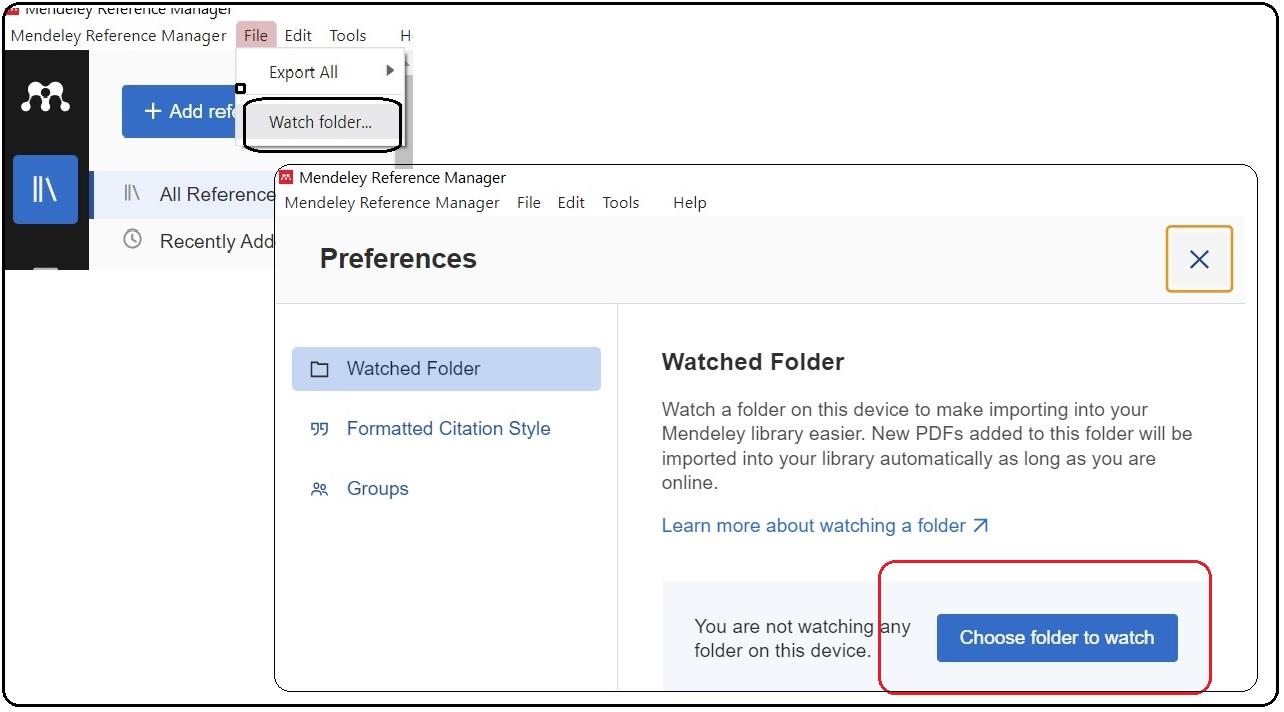
- This will bring up the folder structure on your PC. Under the ‘Watched Folders’ tab tick the folders you would like to watch, and click OK.
- Any PDF that you now add to your chosen folders will be automatically added straight into your Mendeley account.
Don’t forget there are lots of other ways you can add documents to your Mendeley account which you can read about in our previous post.
If you have any questions about Mendeley, pop into the Library or contact us.

Categories & Tags:
Leave a comment on this post:
You might also like…

5 budgeting mistakes students make (and how to avoid them)
Good financial planning isn't about how much money you have. It's about the habits you build. We asked Dr Lakshmy Subramanian, Course Director for the Banking, Economics and Finance MSc, about the budgeting mistakes ...

Finding your reading materials
Use Library Search Library Search is the first place to start when you are trying to find academic sources for your work. This is the search box on the library website homepage. It allows you ...

Formula 1 was the dream and Cranfield was the conduit
I still remember the exact moment Formula 1 (F1) got its hooks into me. I was in my first year of an aerospace undergraduate engineering degree when I watched a video about the sport ...

Introducing Barrington Library
Welcome to all our new students! Barrington Library supports all the students and staff at Cranfield Defence and Security on the Shrivenham site. We are looking forward to meeting you all soon, in person or ...

About to start your journey at Cranfield? We’re here to help!
Congratulations on accepting your offer to study at Cranfield! If you’re keen to get a head start before your course begins, our Library Services team is here to support you every step of the way. ...

Bank holiday hours for Library Services: Monday 31 August
Library Services staff will be taking a break on Monday 31 August for the bank holiday. You will still be able to access all the resources and help you need via our library website. The 24/7 ...
Comments are closed.