

Journal searching tips
16/06/2025

Searching for journal articles can seem a little daunting at the beginning. Here are some of our top tips to get you started when searching for articles in any of our key business journal collections, such as EBSCO Business Source Complete, ProQuest One Business or Emerald.
- Use quotation marks around words to search for them as phrases, e.g. “social media”.
- Use the wildcard symbol (?) to search for multiple spellings of a word, e.g. organi?ation will find both the US and English spellings of the word.
- Use the truncation symbol (*) to search for different word endings, e.g. strateg* will find strategies, strategy, strategic, etc.
- Use the drop-down field selector options (adjacent to the search box) to search for your keywords in the abstract of articles. This will narrow down the results found.
- Where you have a group of alternative terms for the same concept, enter them all in the same search box, using the OR operator between them to indicate that they are interchangeable, e.g. CSR OR “corporate social responsibility” OR “corporate responsibility” OR …
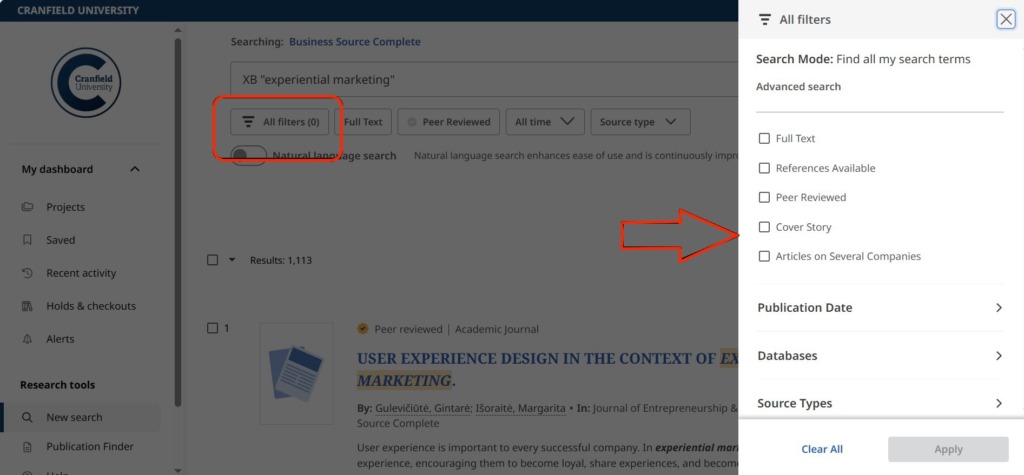
- Refine your results using the limiters available in databases, e.g. by ‘publication date’ or limit your search to ‘scholarly (peer reviewed) journals’ only. Here’s where you’ll find most of the limiters on EBSCO, under the All Filters heading:
- No full text available? Click on one of the ‘Full Text Finder’ options to check if the full text is available in one of our other subscription databases.
- Don’t forget to evaluate your results and, if necessary, refine your search.
- Need help or have any questions about journal searching? Please come and ask us.
This isn’t meant to be an exhaustive list, so please leave a comment if you have any more tips you would like to share!
If you have any questions on searching for academic literature in business and management, please contact the Library.
Feature image from Pixabay. Available at: https://pixabay.com/photos/student-typing-keyboard-text-woman-849824/

Categories & Tags:
Leave a comment on this post:
You might also like…

Setting your research on the right course: Four questions every researcher should ask
Whether you are just beginning your doctoral journey or are already well into your research career, successful research rarely happens by accident. Like any successful mission, it depends on good planning, informed decisions, and getting ...

5 budgeting mistakes students make (and how to avoid them)
Good financial planning isn't about how much money you have. It's about the habits you build. We asked Dr Lakshmy Subramanian, Course Director for the Banking, Economics and Finance MSc, about the budgeting mistakes ...

Finding your reading materials
Use Library Search Library Search is the first place to start when you are trying to find academic sources for your work. This is the search box on the library website homepage. It allows you ...

Formula 1 was the dream and Cranfield was the conduit
I still remember the exact moment Formula 1 (F1) got its hooks into me. I was in my first year of an aerospace undergraduate engineering degree when I watched a video about the sport ...

Introducing Barrington Library
Welcome to all our new students! Barrington Library supports all the students and staff at Cranfield Defence and Security on the Shrivenham site. We are looking forward to meeting you all soon, in person or ...

About to start your journey at Cranfield? We’re here to help!
Congratulations on accepting your offer to study at Cranfield! If you’re keen to get a head start before your course begins, our Library Services team is here to support you every step of the way. ...
Comments are closed.