


Running a peer analysis in Fame
06/02/2025

If you need to compare a UK company’s financial performance against that of other companies, Fame is a great place to start. This database contains the financial accounts of over 8.5 million public and private companies in the UK and Ireland.
Fame offers two useful functions for making a peer comparison – peer comparison and peer analysis. Here we explain the differences between them and how to use them.
Peer Comparison
For this comparison, you will need to have a company in which you are interested. This function uses pre-defined database information to create a peer group, based on your company. It is a quick and easy comparison method.
- Search for your company, then choose ’Peer comparison’ from the left-hand menu. This instantly finds the 10 closest companies to your company in terms of size and industry code (UK SIC).
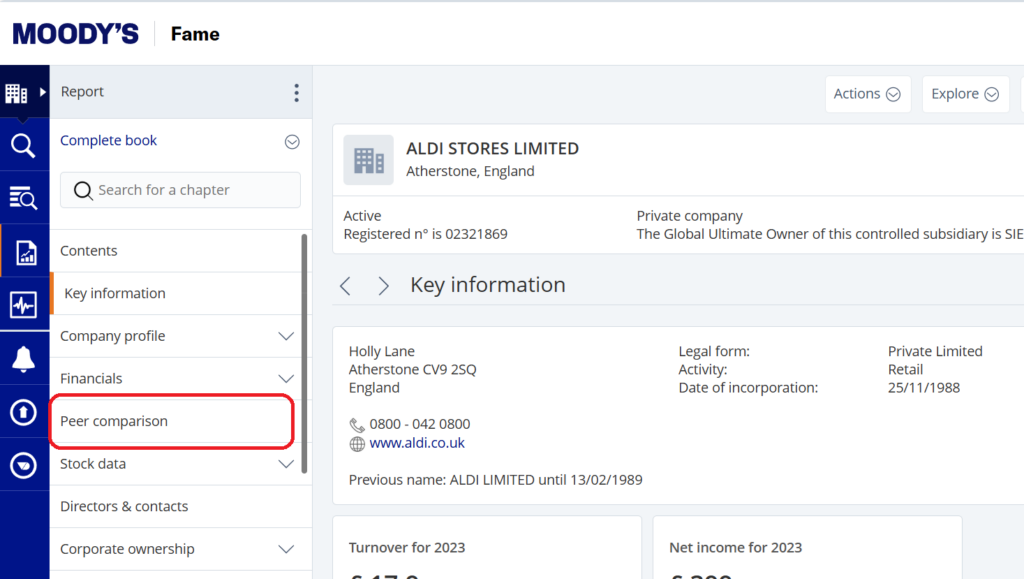
- If 10 companies don’t appear this might be because the company has more recent accounts filed than its peers. In this case, select ‘Own Peer Group’ and change the year in the last box. There are other variables you can change here too.
- In the table, grey columns show rankings within the peer group.
If, having tried it, the peer group composition is not what you expected, use Peer Analysis to create your own peer group.
Peer Analysis
Here you can build a report to benchmark a custom group of companies against each other, so you can make it specific to your requirements – but it needs a bit more work from you.
First, select the companies you want to compare. For this example, we’ll look at UK supermarkets.
-
Search by industry classifications:
- From the home page, choose ‘Activities & Industry’ from the ‘search step’ menu.
- Pick ‘Industry classifications’ from the righthand menu.
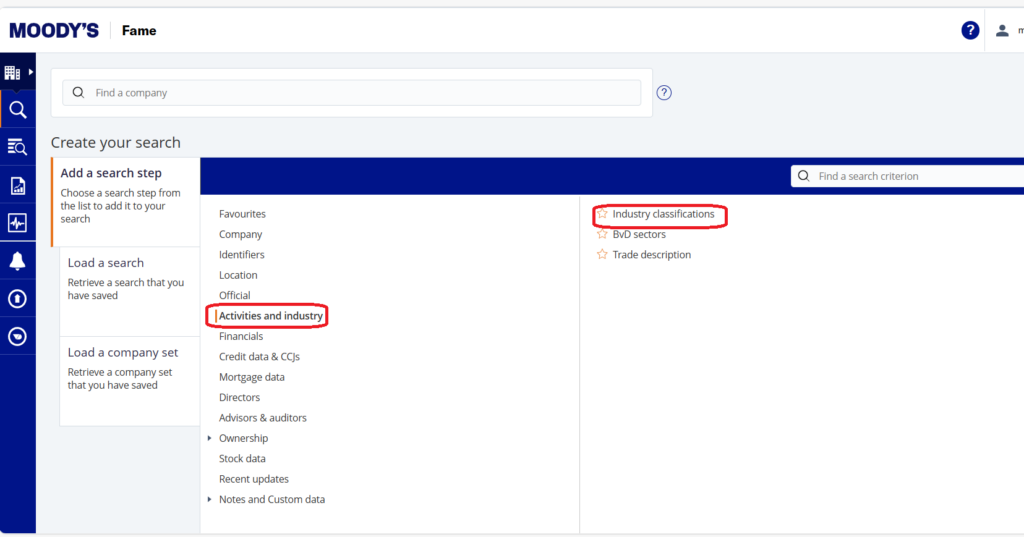
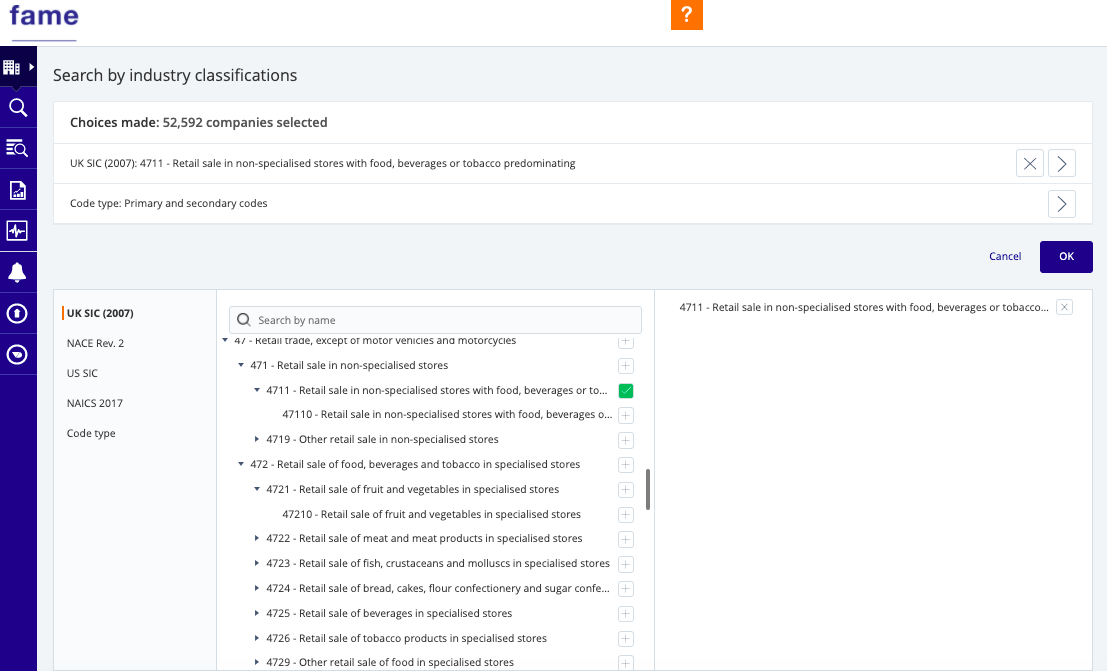
- If you know the SIC code you can search using that, so I know that the UK SIC code for ‘Retail sales in non-specialist stores with food, beverages or tobacco predominating’ is 4711.
- Click the + sign to add the SIC code to your search. It will appear on the right-hand side of your screen.
- If you don’t know the SIC code, you can search by industry name in the search box but be aware you’ll need the correct terminology e.g. it won’t find ‘supermarket’ but will find ‘retail’. You can also browse by using the left-hand arrows to view sub-headings.
- Click OK to return to the search screen.
2. Add filters:
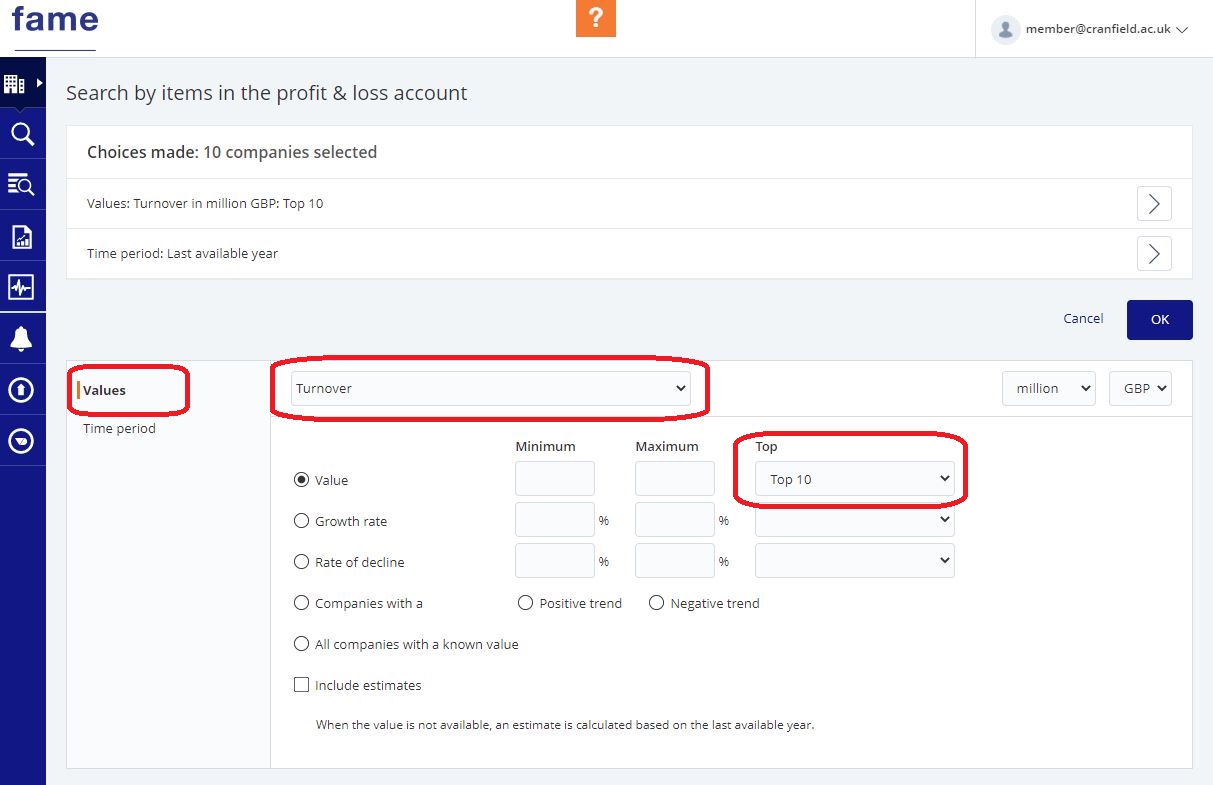
From the search screen, you can add more filters. For instance, to find the biggest supermarkets by turnover:
- Choose Financials from the search menu
- Pick ‘Profit & loss account’ from the righthand menu and select the top 10 companies by Value (you can change the Value from Turnover to a variety of other key financials).
- Click OK.
- Click ‘View Results’ at the right of the screen to display the companies. This is the peer group that you have created
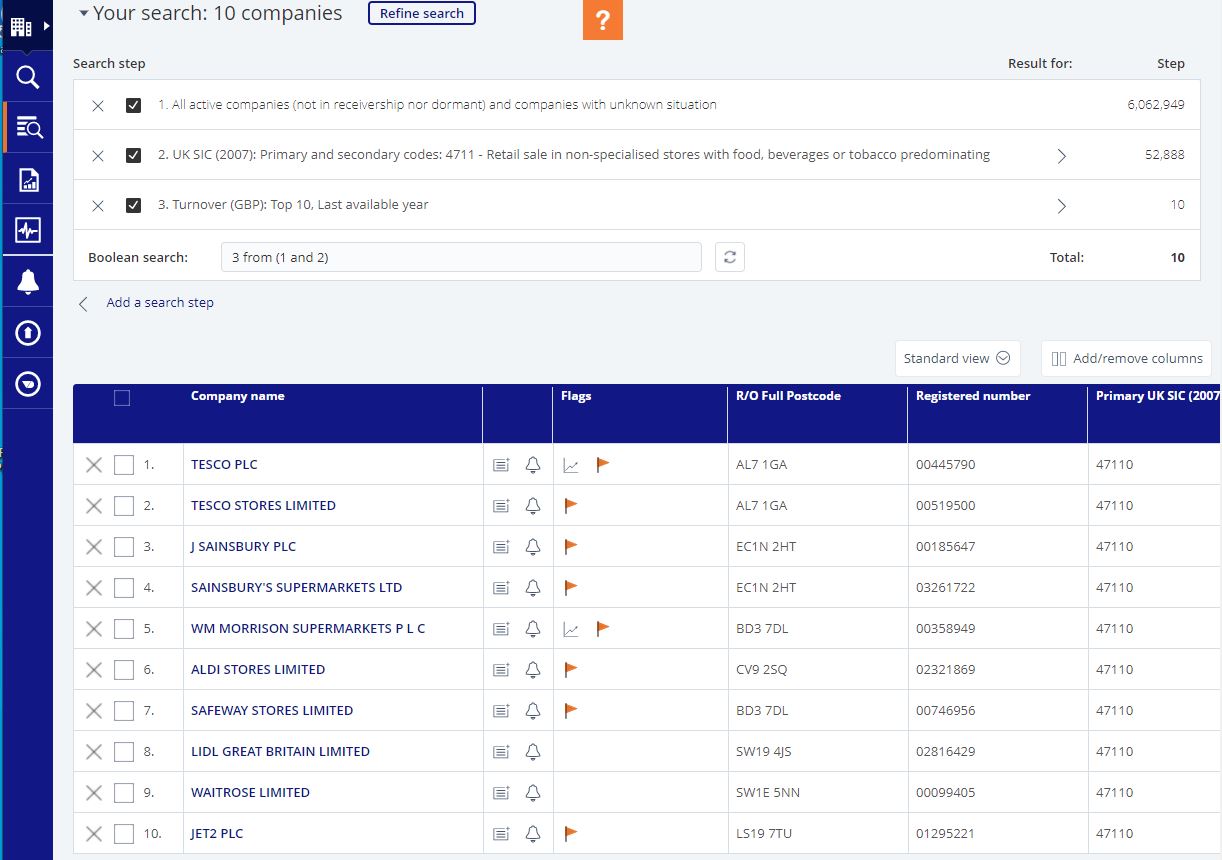
3. Perform peer analysis on your peer group:
- Click the Tools icon on the left and select ‘Peer Analysis’.
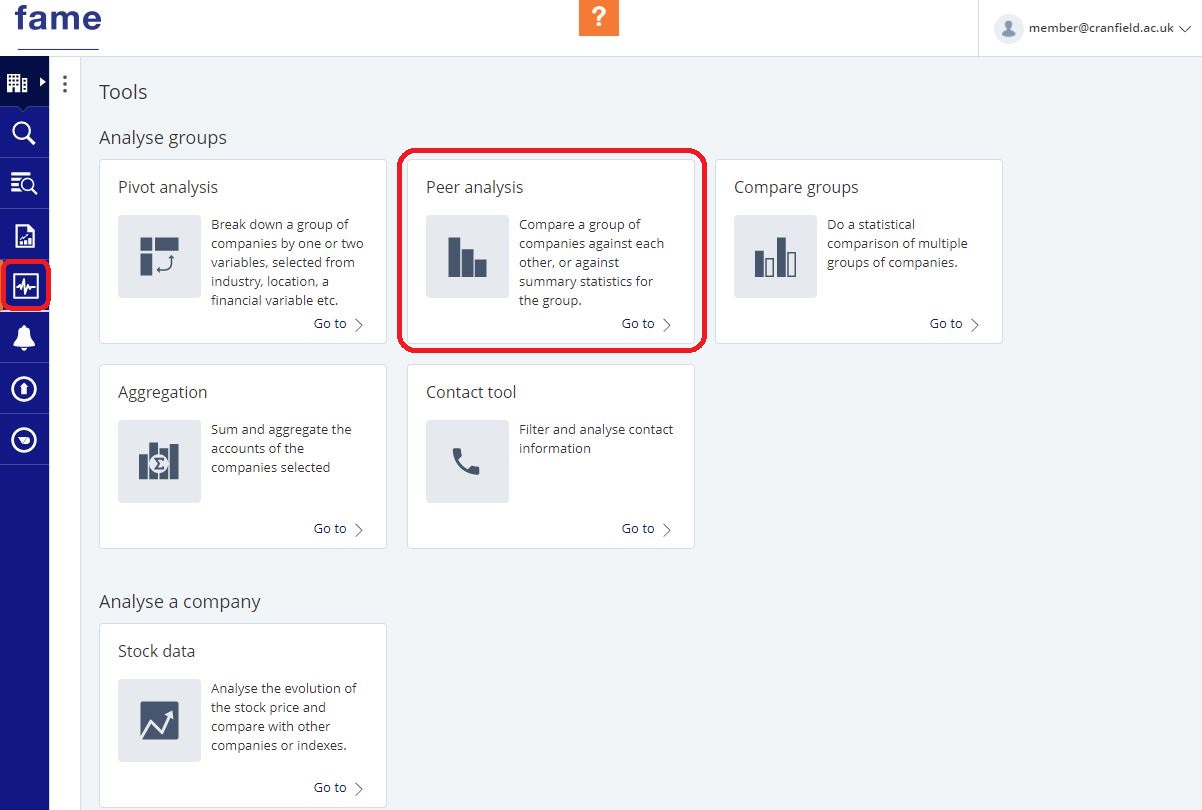
- You can launch a pre-defined analysis, such as ‘Key financials’. Edit the analysis to specify the financial variables and years you want to compare.
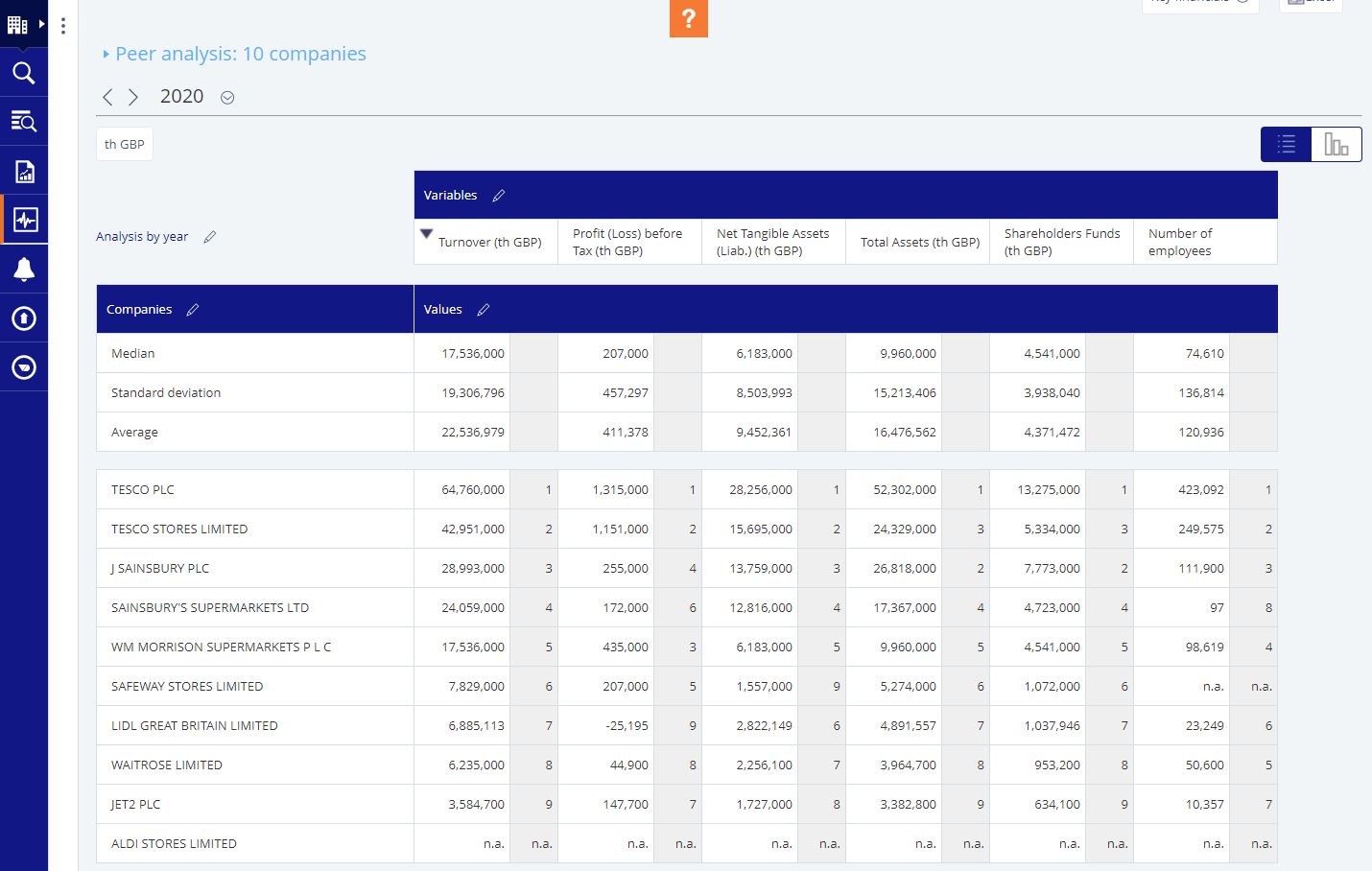
- To export the results, click the Excel icon at the top right of the screen.
If you have any questions about Fame or any of our other financial services please contact us.
Feature image from Pixabay. Available at: https://cdn.pixabay.com/photo/2016/09/19/18/30/calculator-1680905_960_720.jpg

Categories & Tags:
Leave a comment on this post:
You might also like…

Mendeley: a powerful tool to organise and manage your references
Are you looking for a way to manage your references, create in-text citations and reference lists for your assignments or thesis? If so, you may wish to consider using Mendeley. What is it? Mendeley is ...

Keen to develop your study skills?
Alongside the technical skills and academic knowledge that you will gain on your course, as a Cranfield student you have the opportunity to develop a range of other skills that can enhance your learning experience. ...

The V-conomy: powering the sixth wave of global economic growth
The world could be on the verge of a major surge in economic growth and development, driven by the convergence of AI and clean energy technology. Waiting to ride the K-wave The Russian ...

Need help using the Python programming language?
We know some of our students are currently trying to learn Python, so we wanted to make you aware of some great LinkedIn Learning videos that can help. But don't you have to pay for ...

What does it really take to become a Chevening Scholar?
Say “Turkmenistan” to most people and you’ll get a blank look. That was true when I left Ashgabat for the UK to study an MSc in Logistics and Supply Chain Management at Cranfield University ...

Get a head start on referencing and plagiarism
We offer a module on Referencing And Avoiding Plagiarism which you can find on your Canvas dashboard. It explains the role and importance of citing references and how to incorporate the work of other authors ...