


Creating your account on Bloomberg
06/11/2025

Bloomberg users require individual accounts set up. You may be asked to create your account before attending a Bloomberg Taster session – or you may simply want to get started yourself.
You will find our Bloomberg terminals on the ground floor of Kings Norton Library. Once you have logged into the University network on a terminal, you need to double-click on the green Bloomberg icon to get started. Setting up your account only takes a few minutes.
At the default Bloomberg login screen, see below, new users should click on the blue ‘Create a New Login’ link (beneath the login boxes) to start the process.
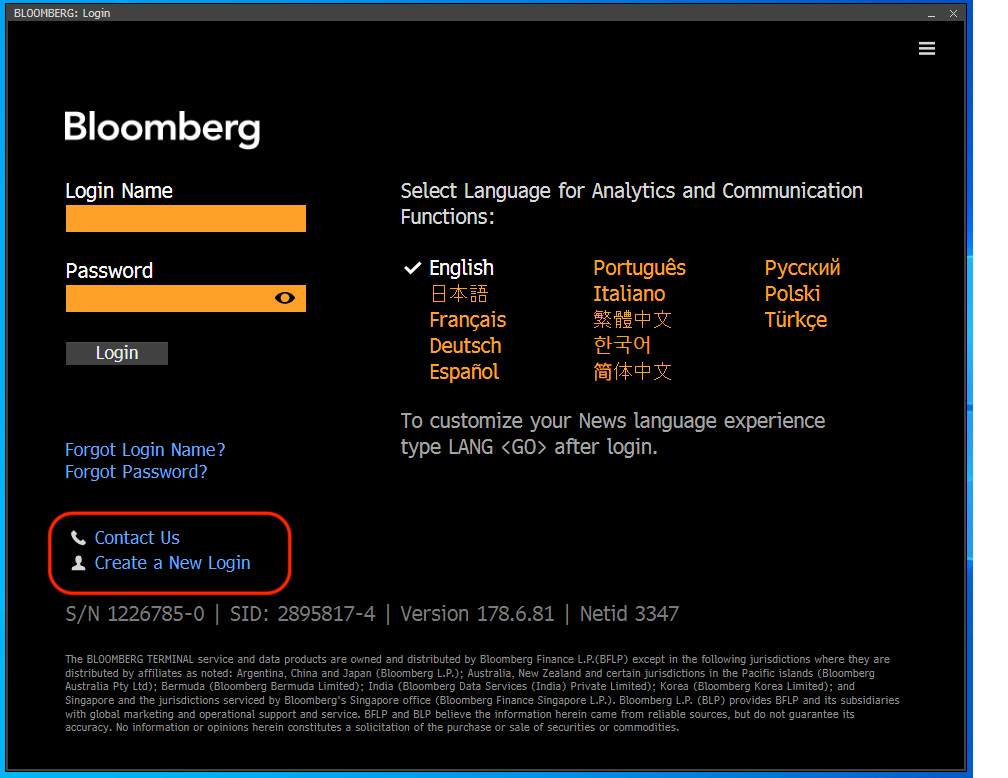
Bloomberg login screen
Next, Bloomberg will ask a few questions about any previous Bloomberg use. Fill these and click to ‘Continue’. If you have an existing account on their system, they will link it to your Cranfield account. If you are going to use our terminals, you will need to have a Cranfield registered account. Bloomberg will not allow logins from other organisations on Cranfield registered terminals.
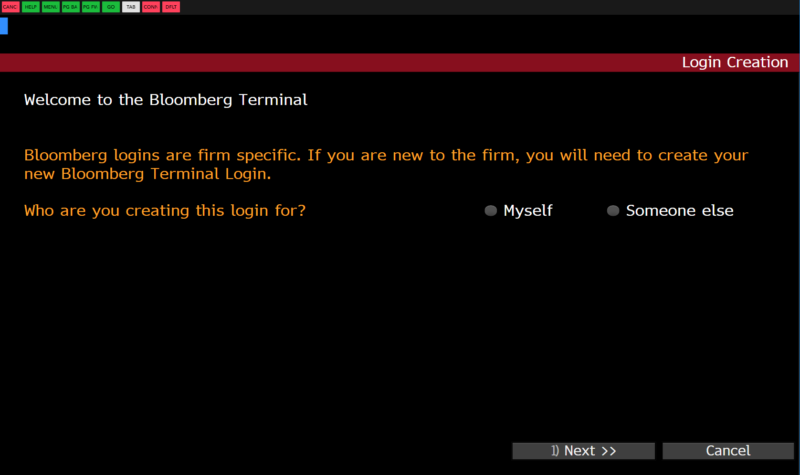
Creating a login
Now fill out your details. Bloomberg will allocate you a login name. Take note of it now. You will need to include two phone numbers and your Cranfield email address. Your ‘work’ phone number will appear on your Bloomberg profile so make sure it is one that you are happy to share.
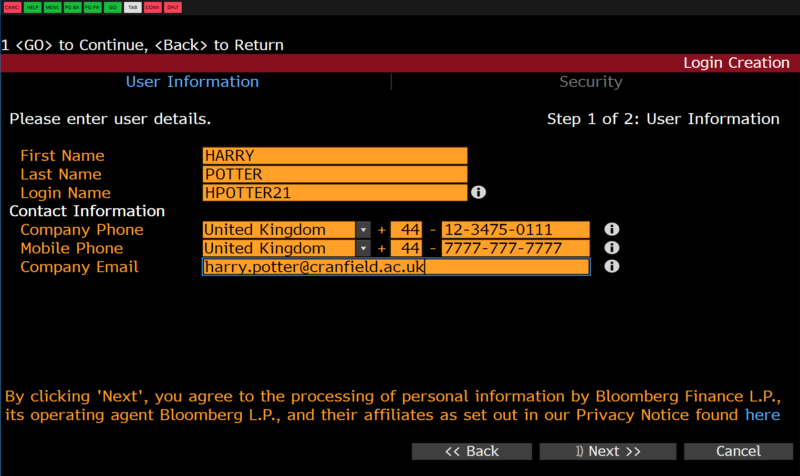
Enter your user information
The next part of your registration process will be to validate your account. This can be done by SMS, telephone call or email. You are free to decide.
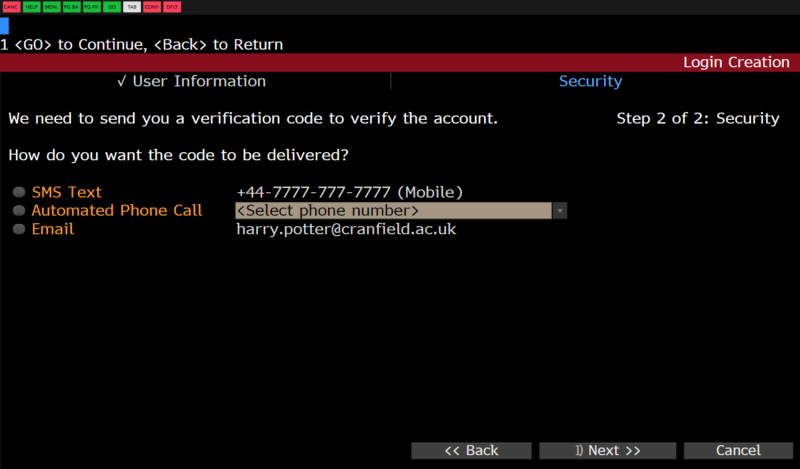
Validating your account – step 1
After this point, Bloomberg will send a validation code to your chosen destination. This can take a few minutes. Use it on the next screen to complete the registration process.
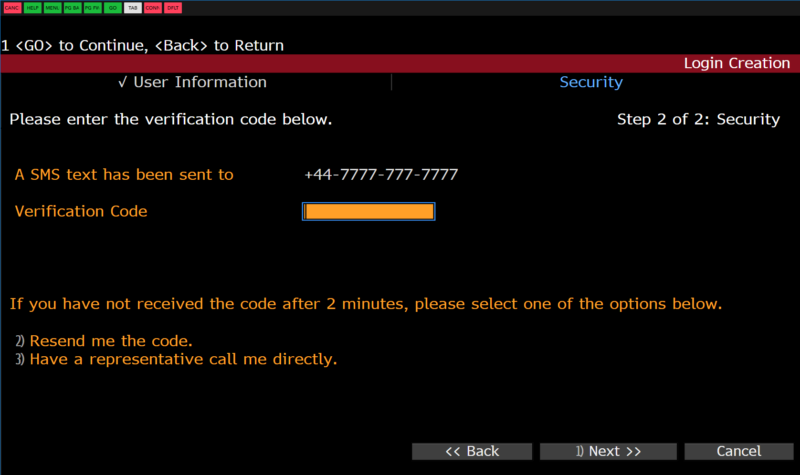
Validating your account – step 2
The final stage of your registration involves setting up your password. Bloomberg has already allocated your username but you set your own password. At the end of the process, you will be taken back to the login screen to login properly for the first time.
When you login for the first time, you are required to set some personal defaults. You can return to this page at any time by using Bloomberg code <PDFQ>.
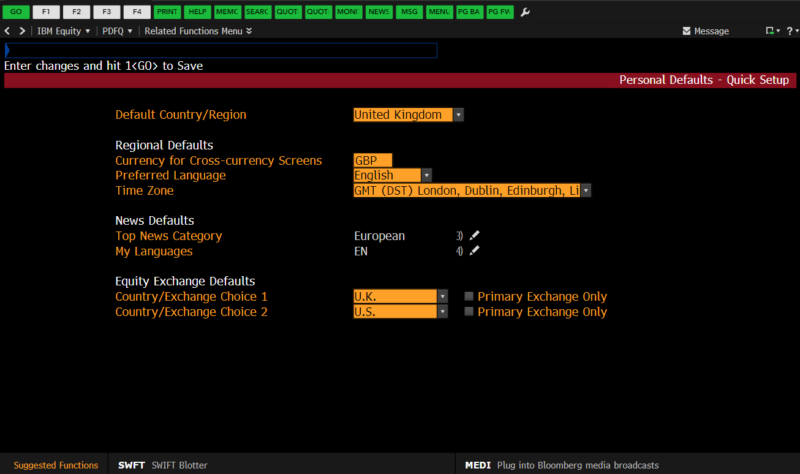
Set your personal defaults
Congratulations! You are now a fully-fledged Bloomberg user. Why not try out Bloomberg’s online training programmes, Bloomberg Certification <BCER> – including Bloomberg Market Concepts <BMC>, to get yourself started?
If you have any questions about Bloomberg or would like to attend a Taster session, please contact the Library.

Categories & Tags:
Leave a comment on this post:
Comments are closed.
You might also like…
Keen to develop your study skills?
Alongside the technical skills and academic knowledge that you will gain on your course, as a Cranfield student you have the opportunity to develop a range of other skills that can enhance your learning experience. ...

The V-conomy: powering the sixth wave of global economic growth
The world could be on the verge of a major surge in economic growth and development, driven by the convergence of AI and clean energy technology. Waiting to ride the K-wave The Russian ...

Need help using the Python programming language?
We know some of our students are currently trying to learn Python, so we wanted to make you aware of some great LinkedIn Learning videos that can help. But don't you have to pay for ...

What does it really take to become a Chevening Scholar?
Say “Turkmenistan” to most people and you’ll get a blank look. That was true when I left Ashgabat for the UK to study an MSc in Logistics and Supply Chain Management at Cranfield University ...

Get a head start on referencing and plagiarism
We offer a module on Referencing And Avoiding Plagiarism which you can find on your Canvas dashboard. It explains the role and importance of citing references and how to incorporate the work of other authors ...

How Cranfield shaped my journey as an Aerospace Engineer
If I'm being specific about the moment it clicked, it was reading a paper called "On the Role and Challenges of Computational Fluid Dynamics (CFD) in the Aerospace Industry" by two Boeing engineers, P. ...
Hi Karen. Thank you for the detailed tips on setting up a Bloomberg account. Your guidance makes the process seem straightforward and manageable, especially for someone new to Bloomberg. Understanding that I need to create my account before attending a Bloomberg Taster session or even initiating the process on my own is really helpful. The instruction to log into the University network on a Bloomberg terminal and then click on the green Bloomberg icon is clear and concise. Also, knowing that the setup only takes a few minutes is reassuring. Your direction to click on ‘Create a new login’ on the default Bloomberg login screen to start the account creation process is particularly useful. I appreciate the time and effort you took to provide these instructions.